Governance and approvals
Business Summary: This section helps leaders and operators control how AI work runs in your organization — who can approve outputs, who has access, and when external systems may be updated. Expected value: accountable automation with audit-ready sign-off instead of ungoverned chat tools.
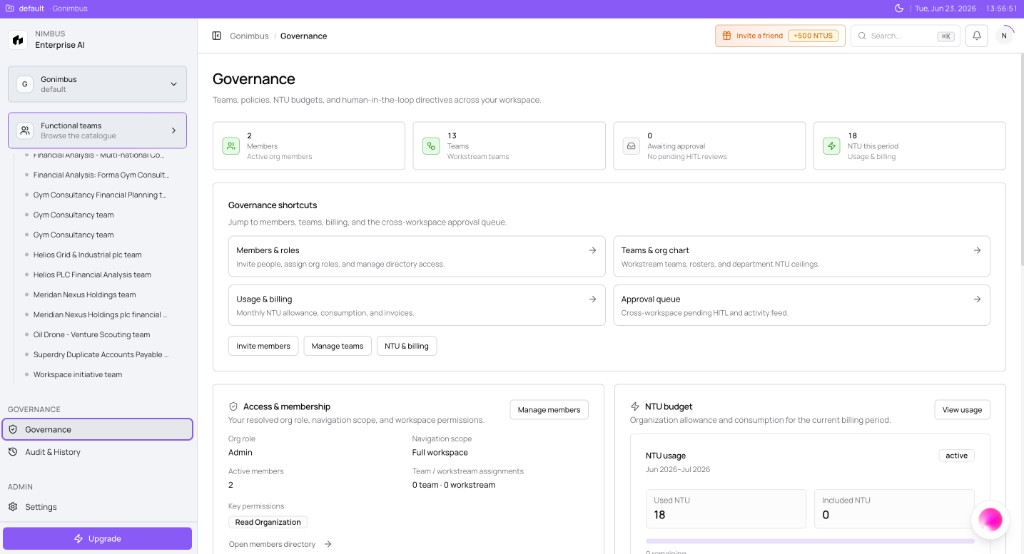
Governance and approvals cover people and roles, decision sign-off (releasing approved outcomes), and org-wide policy (spend limits, connector rules, human-in-the-loop checkpoints).
Three meanings of "commit"
Nimbus uses "commit" in three different ways. Keep this table handy — it prevents confusion when reading billing, workstream, and governance docs.
| Term | Meaning | Where to read more |
|---|---|---|
| Decision commit | An approved outcome released to Outputs or a downstream system | What is a commitment? |
| Goal committed | A workstream record created from scoping or chat | Creating a workstream |
| Billing commitment | Included NTU pool plus optional usage add-ons on your plan | Plans, seats, and included usage |
Note: The Governance page shows live summary cards in many workspaces. Org-wide policy editors continue to roll out; workstream-level HITL and agent governance tabs are the primary controls today.
On this page
- Start here — task guides
- Governance dashboard
- Organization and workstream roles
- Company Wiki access control
- How this fits in Nimbus
- Governance and policy
- People, teams, and decisions
- Recommended path
- FAQs
Start here {#start-here}
| Goal | Guide |
|---|---|
| Understand Admin, Member, Viewer | Organization members and roles |
| Browse teams and org chart | Browsing Teams |
| Configure HITL checkpoints | Human-in-the-loop |
| Grant wiki access safely | Company Wiki access control |
| Get help in the app | Contact support |
Governance dashboard {#governance-dashboard}
Open Governance in the sidebar (breadcrumb Governance).
What you'll see:
| Area | Contents |
|---|---|
| Summary cards | Members (active org count), Teams (workstream teams), Awaiting approval (pending HITL), NTU this period (usage shortcut) |
| Governance shortcuts | Members & roles, Teams & org chart, Usage & billing, Approval queue |
| Quick actions | Invite members, Manage teams, NTU & billing |
| Access & membership | Your Org role, Navigation scope, key permissions, link to members directory |
| NTU budget | Mini NTU usage card with period, used vs included, link to Settings → Usage & Billing |
Billing and NTU pool management live under Settings → Usage & Billing — the Governance dashboard links there rather than duplicating the full billing homepage.
Organization and workstream roles {#organization-and-workstream-roles}
Organization roles (Admin, Member, Viewer) set workspace-wide capabilities; workstream roles (Owner, Approver, Contributor, Viewer) scope each goal. Both layers apply — a Member still needs a workstream team assignment to open a restricted goal.
Full capability tables, wiki grants, and day-to-day examples: Organization members and roles and Workstream teams and access.
Company Wiki access control {#company-wiki-access}
Sensitive wiki content (HR, compensation, personal data) requires explicit grants — not automatic access when someone joins the org. Admins assign wiki scope during invite or directory management.
Policy detail: Company Wiki access control.
How this fits in Nimbus {#how-this-fits-in-nimbus}
Governance connects organization access, workstream HITL, agent triggers, and billing visibility. Every governed run flows through these layers before a decision commit lands in Outputs or an external system.
flowchart TB
  People[People and roles] --> WS[Workstream teams]
  WS --> HITL[HITL checkpoints]
  HITL --> SO[Sign-off]
  SO --> DC[Decision commit]
  Pol[Org policies] --> HITL
  NTU[NTU budgets] --> Charge[Chargeback visibility]
  Run[Agent runs] --> NTU
Governance and policy {#governance-and-policy}
| Article | Description |
|---|---|
| What is governance in Nimbus? | Purpose and layers of control |
| Teams and policies | Governance teams and active policies |
| Human-in-the-loop | Soft, Hard, and Critical checkpoints |
| NTU budgets and chargeback | Allocating usage visibility by business unit |
| Connector and export rules | Action writes and data export gates |
| Org access tiers | Admin, Member, Viewer capability checklist |
| Company Wiki access control | Explicit wiki grants for sensitive content |
People, teams, and decisions {#people-teams-and-decisions}
| Article | Description |
|---|---|
| Organization members and roles | Admin, Member, Viewer and workstream roles |
| Browsing Teams | Org chart, workstream teams table, team profiles |
| Inviting teammates | Onboarding invites and the accept flow |
| Workstream teams | Who can see and run work in a workstream |
| Governance teams | Policy groups and org-wide governance (partial UI) |
| What is a commitment? | Decision commits vs billing commitments — two meanings |
| Sign-off and approval flow | Checkpoints, Needs you, and releasing outputs |
| Where decisions land | Outputs, connectors, activity, and operating memory |
| Tracking committed decisions | Activity, milestones, and audit trails |
Where governance lives today
| Layer | Status | Configure at |
|---|---|---|
| Governance dashboard | Live | Governance sidebar |
| Workstream HITL | Live | Workstream create/edit, Confirm & run |
| Agent profile triggers | Live | Agent detail governance tab |
| Org policy editor | Partial | Governance (expanding) |
| Billing and NTU pool | Partial | Settings → Usage & Billing |
Example scenario
A Business plan department rolls out Nimbus for quarterly planning. Admins invite ten Members, assign workstream teams per goal, and set Strict HITL on board-report workstreams. Agent governance triggers on finance packs require dual approval for ERP writes. Finance maps NTU budgets to FP&A and Marketing governance teams for chargeback visibility while the org billing pool is managed on Settings → Usage & Billing.
Related sections
- Billing and usage — plans, NTU metering, invoices, and run ceilings
- Workstreams — checkpoint UX and presets
- Connectors — Action phase writes
- Audit and history — traceability after sign-off
- Contact support — report application issues
Recommended path {#recommended-path}
| Step | Action | Guide |
|---|---|---|
| 1 | Understand org roles | Organization members and roles |
| 2 | Learn governance basics | What is governance in Nimbus? |
| 3 | Configure workstream gates | Human-in-the-loop |
| 4 | Learn decision sign-off | Sign-off and approval flow |
| 5 | Plan chargeback | NTU budgets and chargeback |
FAQs {#faqs}
Q: Is governance only for large enterprises? A: No. Even small teams benefit from output review and blocking unapproved connector writes. Scale adds NTU budgets and org-wide policy pages.
Q: Where do I manage billing and NTU pools? A: Settings → Usage & Billing — linked from the Governance dashboard NTU & billing shortcut.
Q: Is "commit" the same as "approve"? A: Not exactly. Approve is your sign-off at a checkpoint. Commit (decision) means the approved outcome is released — to Outputs, a connector, or your operating memory.
Q: What's the difference between a workstream team and a governance team? A: A workstream team controls access to a specific goal. A governance team groups people and policies for org-wide rules (NTU budgets, connector rules).
Q: Who grants Company Wiki access? A: Admins — explicitly, not by default on org join. See Company Wiki access control.
Q: Where should I start if I'm new to governance? A: Read Organization members and roles, then configure HITL when you scope your first production workstream.