Connectors and integrations
Business Summary: This section shows how to link Nimbus to your business systems — browse the catalog, connect your apps, and assign them when scoping workstreams.
Connectors link Nimbus to the systems your organization already uses — CRMs, data warehouses, messaging tools, document stores, and more. Connect once at the organization level; assign sources when scoping a Workstream.
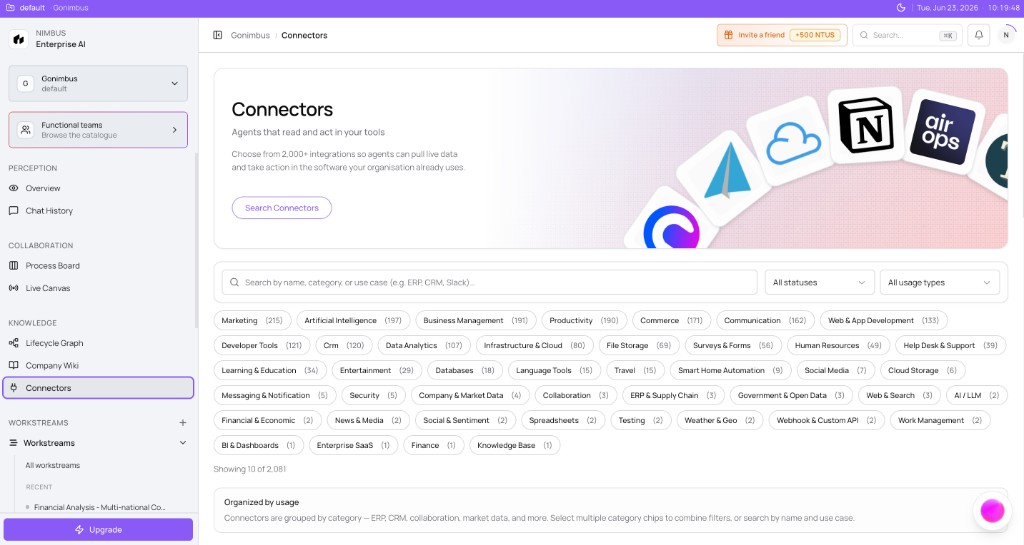
What you'll see: Breadcrumb Connectors; hero Agents that read and act in your tools; 2,000+ integrations; Search Connectors; search field Search by name, category, or use case…; category chips (Marketing, CRM, Developer Tools, and more); footer Showing 10 of 2,081.
On this page
- Start here — task guides
- What are connectors?
- Intelligence vs Action connectors
- Connector readiness
- Managing connections
- Connectors and the Wiki
- Example scenario
- FAQs
How this fits in Nimbus
Connectors are the data and action layer beneath agents and Workstreams.
flowchart LR
  Connectors[Connectors] --> Intel[Intelligence reads]
  Connectors --> Action[Action writes]
  Intel --> Agent[Agents]
  Agent --> Workstream[Workstreams]
  Connectors --> Wiki[Company Wiki]
Start here {#start-here}
| Goal | Guide |
|---|---|
| Connect CRM, ERP, or docs | Connecting a connector |
| Set Slack channels or export folders | Configuring a connector |
| Search the catalog | Connector catalog |
What are connectors? {#what-are-connectors}
A connector is a secure link between Nimbus and an external system — your CRM, ERP, data warehouse, messaging platform, news feed, or document store. Connectors give agents the data and tools they need to produce credible analysis and, when approved, take action in your systems.
Without connectors, agents can only work from what you type in chat or upload manually. With connectors, they pull live metrics, query records, monitor freshness, and — through governed Action connectors — post updates back to the tools your teams already use.
Connectors sit between your organization's systems of record and governed work inside Workstreams. You connect sources once at the organization level, assign them when scoping a workstream, and agents pull from those connections during each run. When you open Connectors in the sidebar, you are managing the shared library every agent and workstream in your workspace can draw from — subject to governance rules on reads and writes.
A large catalogue, structured for agents
The connector catalogue lists thousands of integrations when your workspace is connected to the full vendor directory. The core Nimbus catalogue includes roughly 40 curated connectors plus omnipresent workspace tools; when the full vendor directory is enabled, the browse list merges ~2,000 additional SaaS apps at runtime. Many curated intelligence vendors may show Coming Soon until Nimbus completes contract and OAuth wiring. OAuth integration details are documented in the admin Connectors — technical appendix (support and admin audiences).
Unlike platforms that dump an undifferentiated list, Nimbus structures connectors so agents know which integrations are relevant to a given use case. When you scope a workstream or run readiness checks, Nimbus surfaces the connectors that match the specialist team's requirements — not every connector in the catalogue.
Some integrations are omnipresent — available across the workspace for common collaboration and file tools (Slack, Google Drive, Sheets, Notion, webhooks). These sit alongside workstream-specific connectors you bind when scoping a goal.
Why connectors matter
Connectors answer three practical questions for every agent run:
- Can the agent see the data it needs? Intelligence connectors supply read access to CRM pipelines, GL actuals, web traffic, news signals, and more.
- Can the agent act when you approve? Action connectors enable writes — Slack messages, spreadsheet updates, ticket creation — under governance rules.
- Is the setup credible before you spend NTUs? Agents declare connector requirements so Nimbus can tell you what is missing before a run starts.
Connecting sources early is one of the highest-impact steps in onboarding. See the Onboarding checklist.
How connectors relate to other concepts
| Concept | How connectors fit |
|---|---|
| Agent | Each agent declares which connectors it expects — required or optional — for credible runs. |
| Workstream | When you scope a workstream, you assign connectors that the agent will use for that goal. |
| Company Wiki | Document connectors can sync files into wiki vaults for search and graph linking. |
| Governance | Action connector writes typically require human-in-the-loop (HITL) approval before execution. |
| Lifecycle Graph | Indexed wiki content and domain context from connectors enrich what agents can reference. |
Connector availability
Each card shows a status badge:
| Badge | Meaning |
|---|---|
| Available | You can connect and use this connector now. |
| Beta | Early access — connectable, but behavior may change. |
| Coming Soon | Listed for planning; the connect toggle is disabled until release. |
See Connector catalog for browse and filter details.
Intelligence vs Action connectors {#intelligence-vs-action-connectors}
Nimbus organizes connectors into two phases. The phase tells you — and every agent — whether a connector is for reading data or for making changes in external systems.
flowchart TB
  Intel[Intelligence connectors] -->|read| Agent[Agent analysis]
  Agent --> Approval[Human approval]
  Approval --> Action[Action connectors]
  Action -->|write| External[External systems]
Most teams connect Intelligence sources early, then enable Action connectors when they are ready for governed automation downstream.
Intelligence connectors
Intelligence connectors let agents read and analyze data from external sources — CRMs, data warehouses, ERP and finance systems, news feeds, web crawl tools, and analytics platforms. They do not modify your external systems. They supply context for Perception, Analyze, and Plan modes in workstream chat, and they feed data landing stages when an agent run pulls structured records.
On the Connectors page, the Intelligence section is titled Intelligence with the description: Read and analyze data from external sources for agents and boards.
Action connectors
Action connectors let agents write data, trigger workflows, and execute operations — posting to Slack, updating a spreadsheet row, creating a ticket, or sending email. Action connectors carry higher governance weight. Before an agent executes a write, Nimbus typically pauses for human-in-the-loop (HITL) approval — especially when your governance policy requires sign-off on external writes.
Side-by-side comparison
| Intelligence | Action | |
|---|---|---|
| Purpose | Read and analyze | Write and execute |
| Risk profile | Lower — read-only | Higher — changes external state |
| Typical examples | Snowflake, Salesforce, Google Analytics, NewsAPI | Slack, SAP postings, Intercom, webhooks |
| Governance | Data access policies | External write approval, spend gates |
| When to connect | Early — needed for most agent runs | When you are ready for governed automation |
Some Action connectors are omnipresent — eligible to every agent without being listed in that agent's specific requirements (Slack, Google Sheets, Google Drive, Notion, Jira, Gmail, webhooks). You still connect them at the organization level.
When you confirm an agent run plan, the plan summary lists Intelligence pulls and Action writes separately. Intelligence steps gather evidence; Action steps appear only after approvals where required.
Connector readiness {#connector-readiness}
A workstream run needs the connectors you bound when you scoped it. Nimbus checks those connections before and during the run so you are not surprised by empty analysis or failed writes.
flowchart TB
  Agent[Agent definition] --> Req[Connector requirements]
  Req --> OrgConn[Organization connections]
  OrgConn --> Workstream[Workstream assignment]
  Workstream --> Ready[Readiness check]
  Ready --> Run[Governed run]
A connector requirement includes a plain-language label, Required or Optional strength, one or more catalogue IDs that satisfy it, a reason why the agent needs the source, and alternatives when listed. You satisfy requirements by connecting at least one listed connector in the Connector catalog.
| Strength | Effect on runs |
|---|---|
| Required | Run plans and readiness checks expect a connected connector from the listed set. Missing required connections are primary blockers. |
| Optional | Recommended for richer outputs. Runs may proceed without them, but analysis may be thinner. |
Where you see requirements
- Workstreams — the scope shows which connectors this goal will use.
- Run plan and chat — Plan mode checks workstream readiness before Confirm & run. Missing connectors produce guidance to connect sources first.
Common readiness blockers
- Required connector not connected — none of the listed connector IDs have an active organization connection.
- Wrong phase — the agent needs Intelligence read access; an Action-only connection does not satisfy a data pull requirement.
- Coming Soon or Beta gap — a requirement lists a connector that is not yet Available in your environment.
- Workstream not assigned — connectors are connected at org level but not selected for the workstream scope.
- Action write without governance — Action steps need both a connected Action connector and approval policy configured.
Readiness checks protect your NTU budget. Running a finance agent without actuals forces the agent to guess — producing low-confidence output that still consumes tokens. See Creating a workstream for connector assignment during scoping.
Managing connections {#managing-connections}
After you connect a connector, Nimbus tracks an organization connection — the live link between your workspace and the external system. You manage these connections from the Connectors page and, for document sources, from the Company Wiki settings panel.
flowchart TB
  Connectors[Connectors page] --> OrgConn[Organization connection]
  OrgConn --> Workstreams[Workstreams using the source]
  OrgConn --> AgentRuns[Agent runs and wiki sync]
  Disconnect[Disconnect toggle] --> OrgConn
Viewing connection status
Each card footer shows one of:
| Label | Meaning |
|---|---|
| Not connected | Toggle is off; no active connection |
| Connecting… | OAuth or credential validation in progress |
| Connected | Active connection; toggle is on |
| Disconnecting… | Revocation in progress |
| Error text (red) | Last connect or disconnect attempt failed |
Connected Action cards may show a Configure button when additional setup is required (channel, folder, or action defaults).
Disconnecting and reconnecting
Turn the connect toggle off on the connector card to revoke the organization connection. Agents that depended on that connector will fail readiness checks until you reconnect. Wiki folders sourced from that connector stop receiving new syncs; existing indexed files may remain until you unsync or remove them.
To rotate OAuth tokens or API keys: disconnect (toggle off), toggle on again, and complete the connect flow with fresh credentials. Confirm Connected before retrying agent runs or wiki syncs.
Connections belong to your organization — one connection per connector ID, shared across workstreams. Workstream assignment chooses which connected sources a specific workstream may use when scoping.
Troubleshooting
| Issue | What to do |
|---|---|
| Could not start connector authorization | Retry; confirm organization is selected and network is stable. |
| OAuth popup was blocked | Allow popups; toggle off and on to restart OAuth. |
| OAuth connection failed | Vendor rejected authorization — check account permissions with your IT admin. |
| Connector catalogue unavailable | Administrator issue — click Retry after service health is confirmed. |
Before disconnecting a widely used connector, consider in-flight agent runs, workstreams scoped to that connector, and wiki sync jobs. Prefer maintenance windows for production CRM, ERP, or warehouse connectors.
Connectors and the Wiki {#connectors-and-the-wiki}
The Company Wiki extends beyond manual uploads by importing folders from cloud systems — Google Drive, Dropbox, Notion, SharePoint, and others.
Note: Connectors in the sidebar is live today. The full Company Wiki experience — file explorer, sync wizard, and automatic indexing — is still rolling out in some workspaces.
flowchart LR
  Connect[Connect on Connectors page] --> Browse[Browse CONNECTORS in wiki]
  Browse --> Sync[Sync to vault]
  Sync --> Index[Index for search]
  Index --> Agent[Agent evidence in runs]
- Connect the document connector on the Connectors page (OAuth — see Connecting a connector).
- Browse the connector as a folder tree inside a wiki vault under CONNECTORS.
- Sync selected files into the vault (up to 200 files per sync in the current wizard), then index them for search.
Indexed wiki content gives agents approved policy language, stable definitions, and searchable evidence linked in the lifecycle graph — alongside live Intelligence connector data inside Workstreams. Connect on Connectors; browse, select, and sync from the Company Wiki file explorer.
Example scenario
Maria leads revenue operations at a mid-size SaaS company. Her team scopes a Workstream for Q3 pipeline review and assigns the Revenue agent. Before the first run, Nimbus flags a missing connector — the agent needs read access to Salesforce pipeline data.
Maria opens Connectors, connects Salesforce under Intelligence, and returns to the workstream. Readiness checks pass, and the agent produces a variance narrative grounded in live opportunity stages instead of a manual spreadsheet export. When the analysis is approved, an Action connector posts a summary to the sales Slack channel — only after Maria signs off on the Confirm & run card.
FAQs {#faqs}
Q: Where do I manage connectors in Nimbus? A: Open Connectors in the sidebar (Knowledge section).
Q: How many integrations are available? A: The catalog shows 2,000+ integrations (for example, 2,081 in a fully configured workspace), including apps from the extended vendor directory merged at runtime.
Q: Do I need connectors before running an agent? A: Connect the sources a workstream will read before you confirm a governed Plan. See Connector readiness.
Q: What is the difference between Intelligence and Action connectors? A: Intelligence connectors read and analyze; Action connectors write and execute after approval. See Intelligence vs Action connectors.
Q: Can connectors feed the Company Wiki? A: Yes. After connecting a document source, sync folders from the wiki file explorer. See Connectors and the Wiki.
Q: Who can disconnect a connector? A: Members with connector management permission — typically admins. Disconnecting revokes external access; artifacts already imported remain unless you delete or unsync them separately.
Q: Do connectors cost extra NTUs? A: Connector usage is part of agent work. You see expected NTU quotes before each run; pulling data or executing actions consumes tokens as part of that run's budget.