Setting goals
Business Summary: A goal is a target you read your team's work against, such as "Book 60 qualified demos this quarter". Harmony can count progress for you or you can record it in check-ins, and the goal shows whether you are on track.
Goals are optional. Harmony doesn't need them to show spend or useful work. Add one when a team has a number it cares about and you want to see the work beside it.
Admins create, edit, link and check in goals. Everyone in a team can read its goals.
Step-by-step: create a goal
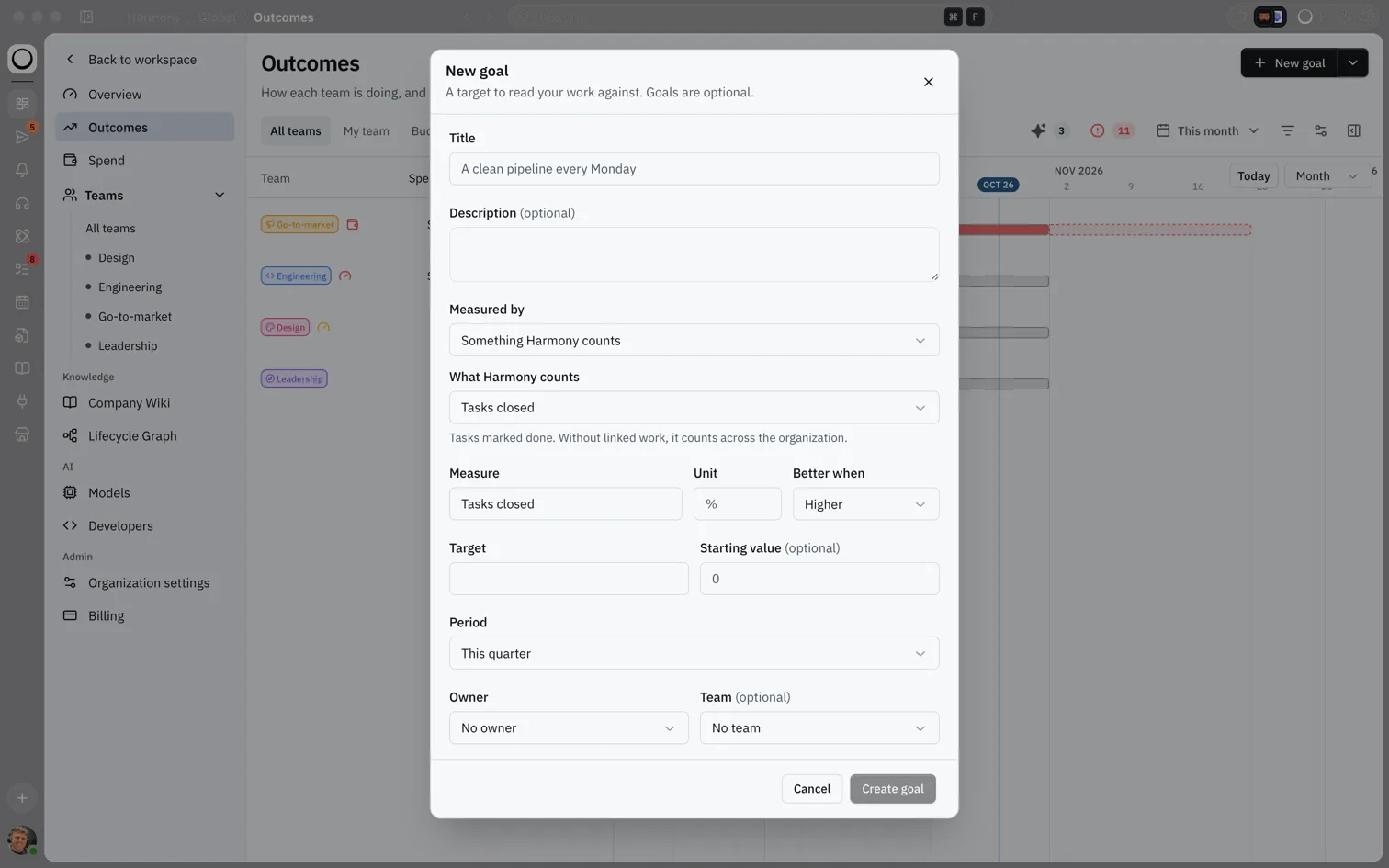
- Open Outcomes and choose New goal at the top right.
- Give the goal a Title, and a Description if it helps.
- Choose how it is Measured by:
- Something Harmony counts: Harmony reads the number for you.
- A number a Loop reads from a connected tool: pick the Loop and the number it reports, for example a figure from your CRM.
- Check-ins people enter: you record the value yourself from time to time.
- If Harmony counts it, choose What Harmony counts (see the table below). Then check Measure, Unit and Better when: Higher for most goals, Lower for things like cost or error rates.
- Enter the Target, and a Starting value if you don't start from zero.
- Choose the Period: This quarter, Next quarter, This month, This year or Custom dates.
- Pick an Owner and, if you like, a Team. A goal with no team belongs to the whole organization.
- Choose Create goal. It appears in the Goals view straight away.
What you'll see: A dialog titled New goal with the line "A target to read your work against. Goals are optional."
flowchart LR
  New[New goal] --> Measure[Measured by]
  Measure --> Target[Target and period]
  Target --> Owner[Owner and team]
  Owner --> Create[Create goal]
  Create --> Link[Link work]
What Harmony can count
| Choice | What it counts |
|---|---|
| Tasks closed | Tasks marked done. |
| Loop runs completed | Runs of Loops that finished. |
| Useful outcomes | Work people marked useful. See Judging work and the useful rate. |
| Reports delivered | Reports that were sent. |
| Hours returned (estimate) | Hours your admins estimate the useful work saved. Always an estimate. |
Harmony counts within the goal's period. When the goal has linked work, it counts only that work; without linked work, it counts across the organization. A number that can't be read on a given day is skipped, never recorded as zero.
Link work to a goal
Linking work tells Harmony which Loops and workstreams the goal is about. Counted goals then count only that work, and the goal page shows how the work went beside the goal.
- Open the goal's page from its panel (the arrow at the top) or its three-dot menu.
- Under Linked work, choose Link work.
- Choose the Kind, Loop or Workstream, pick the item, then choose Link.
You can also link a Loop from the goal's panel, in Loops under Properties. To remove a link, choose Unlink and confirm. Due tasks in linked workstreams then appear as milestones on the goal.
Record a check-in
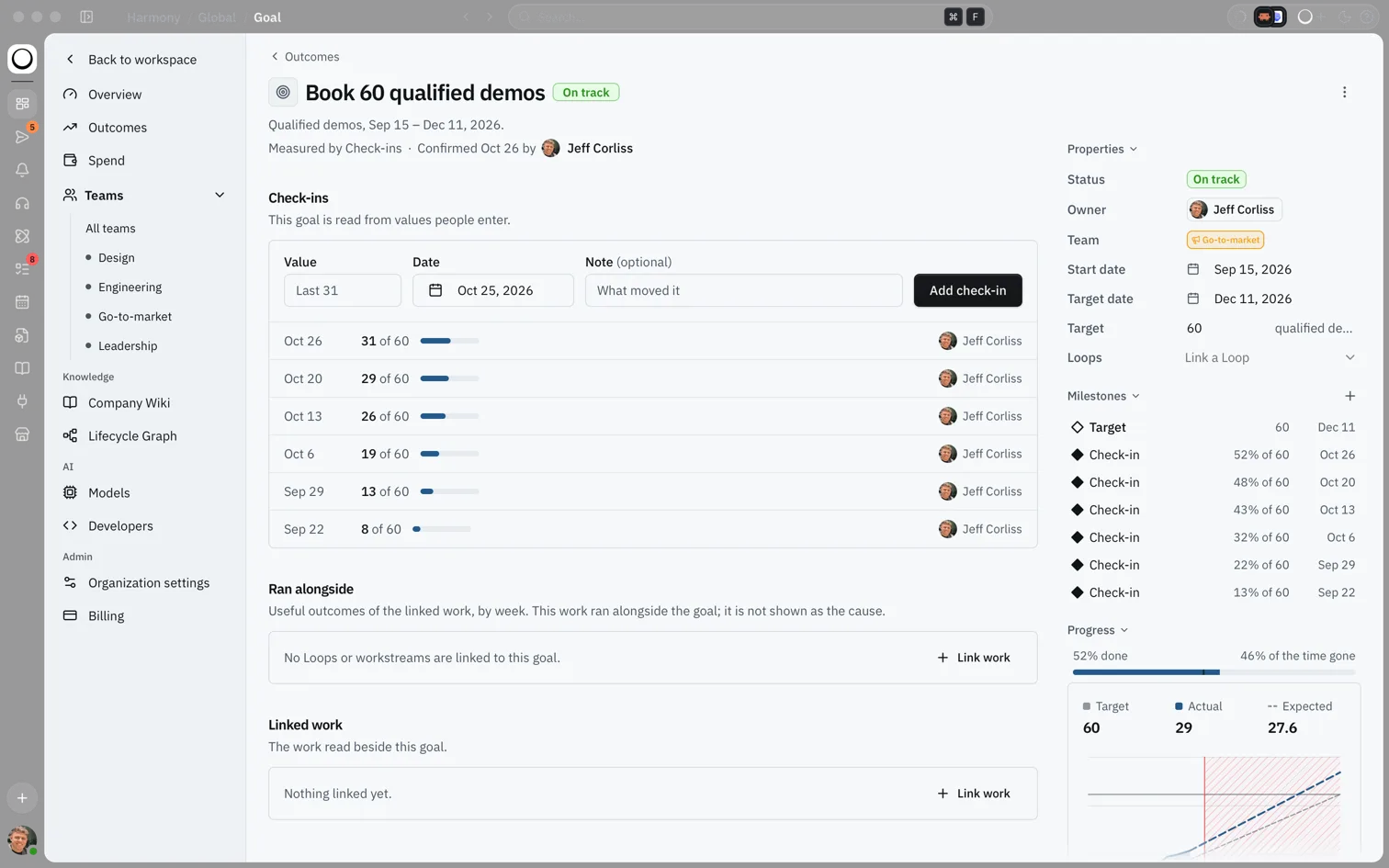
Check-ins are readings with a date. They move a check-in goal forward, and a note turns a check-in into a diamond on the timeline.
- Open the goal's page.
- Under Check-ins, enter the Value, the Date and, if you like, a Note saying what moved it.
- Choose Add check-in.
From the goal's panel you can also choose + next to Milestones to add a reading for today. Only admins can add check-ins.
Goals Harmony suggests
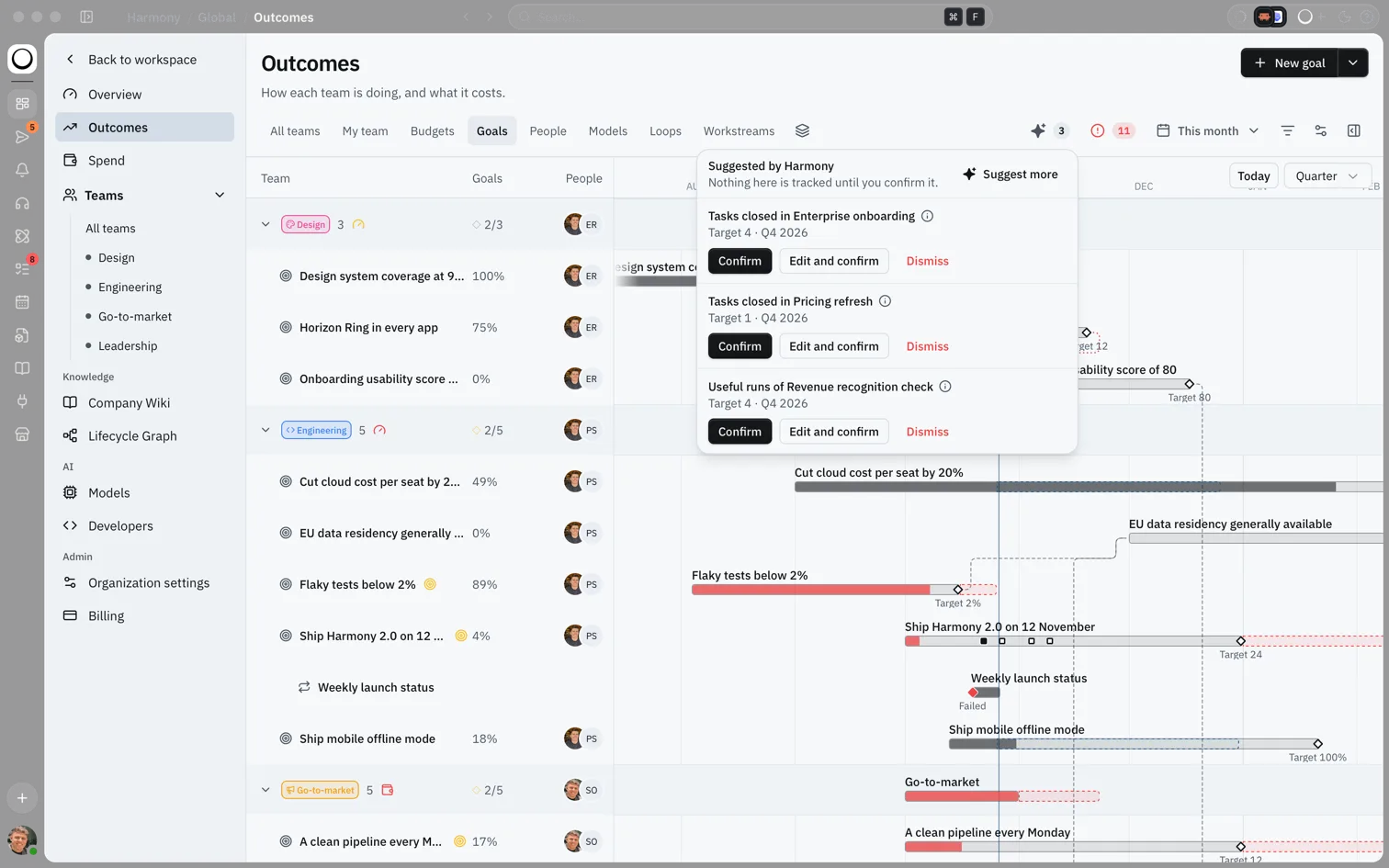
Harmony can suggest goals from the work your teams already do, such as "Tasks closed in Enterprise onboarding" or "Useful runs of Revenue recognition check". Each suggestion has a target based on the last 30 days and runs for the current quarter. Nothing is tracked until an admin confirms it.
- Choose the arrow beside New goal, then Suggest goals. Or open the sparkle button in the toolbar, which shows how many suggestions are waiting.
- For each suggestion choose Confirm, Edit and confirm to change it first, or Dismiss.
- Choose Suggest more for another set. Harmony offers up to three at a time.
How this fits in Harmony
A goal reads from the work you link to it, or from your check-ins. Outcomes then shows its progress against time.
flowchart LR
  Work[Linked Loops and workstreams] --> Reading[Readings]
  Checkins[Check-ins] --> Reading
  Reading --> Status[On track or Behind]
  Status --> Outcomes[Outcomes and Needs attention]
On track or behind
Progress is how far the latest reading has moved from the starting value toward the target. A goal is On track when its progress is at least the share of its time gone, less 10 points. Otherwise it is Behind, and it shows in Needs attention. Before its first reading, a goal shows No reading yet.
The goal page
The page for one goal shows its status, what it is measured by, and who confirmed it. It also has:
- Check-ins: every reading, newest first.
- Ran alongside: the useful work from the linked Loops and workstreams, week by week. This work ran alongside the goal; Harmony doesn't claim it caused the change.
- Impact: once a goal has at least four readings over at least two weeks on each side of when the linked work started, the page compares before and after. It is always labelled an estimate.
- Linked work: the Loops and workstreams the goal reads.
To stop tracking a goal, open its three-dot menu and choose Archive goal.
Example scenario
Sam runs sales. He creates "Book 60 qualified demos", measured by Check-ins people enter, for This quarter, owned by himself and the Go-to-market team. Every Monday he adds a check-in with a short note. Halfway through the quarter he has 31 of 60, 52% done with 47% of the time gone, so the goal reads On track. He links the "Pipeline hygiene" Loop so the goal page shows that work week by week beside his numbers.
FAQs {#faqs}
Q: Who can create goals? A: Admins. Members can read the goals of their teams, open goal pages and see progress.
Q: Can members add check-ins? A: Not yet. Check-ins are added by admins today, including on goals measured by Check-ins people enter.
Q: Does Harmony say my work caused the goal to move? A: No. Linked work is shown as having run alongside the goal. The Impact section, when there is enough data, is labelled an estimate.
Q: Can I link a Marketplace install or another goal? A: Not in the app yet. You can link Loops and workstreams from the goal page and its panel.
Q: What happens to the old Goals page? A: It now opens the Goals view of Outcomes, so old links keep working.
Q: Can I remove a goal's owner or team? A: You can change them, but not clear them once set. Archive the goal and create a new one if you need it without an owner.