Local models and self-hosted servers
Business Summary: You can chat with Harmony using a model that runs on your own computer, such as one in Ollama or LM Studio, at no cost and without using your limits. Admins can also connect the organization's own model servers, which can run chat and Loops for everyone.
Some work is better kept on hardware you control: a private draft, an experiment with an open model, or a team that runs its own GPUs. Harmony can use those models alongside its own. It checks each model first, so it is only offered for work it can actually do.
Step-by-step: use a model on your computer
- Connect your computer to Harmony, if you haven't yet. See Connecting a computer.
- Start your model app on that computer: Ollama, LM Studio, Jan, llama.cpp (its server) or Msty. Download a model in that app first, for example with
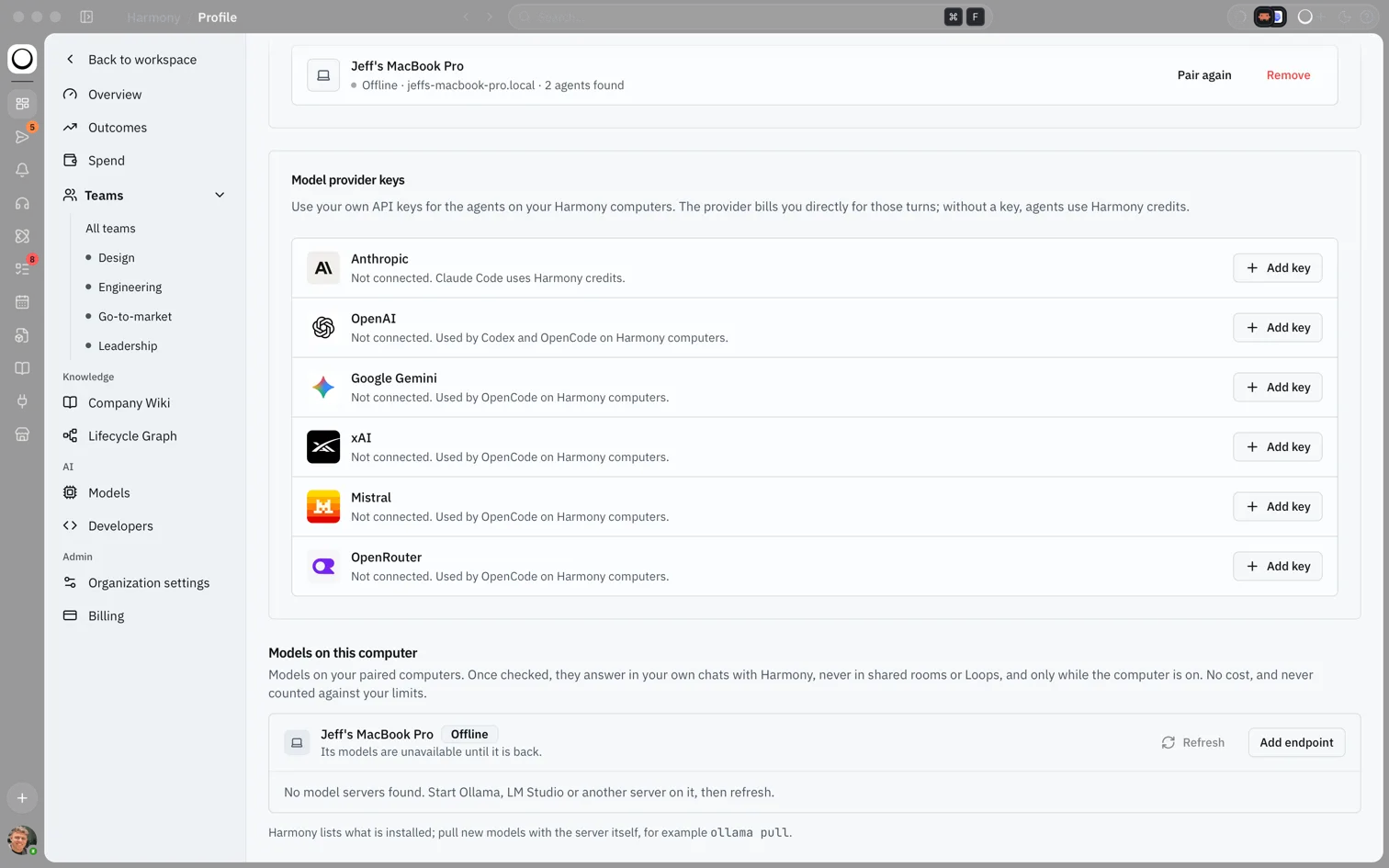
ollama pull. - Open your profile, choose External agents, and scroll to Models on this computer. Choose Refresh if your models aren't listed yet.
- Choose Use next to a model. Harmony checks what it can do; this can take a few minutes for a large model.
- Once the check clears it, pick the model from the model chip beside the chat box in a private chat with Harmony.
- To stop, choose Stop using.
What you'll see: The Models on this computer card with your computer's name and whether it is online, each model Harmony found, and Refresh and Add endpoint buttons. If none are found: "No model servers found. Start Ollama, LM Studio or another server on it, then refresh."
flowchart LR
  Pair[Connect your computer] --> Start[Start your model app]
  Start --> List[Models on this computer]
  List --> Use[Use: Harmony checks it]
  Use --> Chat[Pick it in a private chat]
How Harmony finds your models
The Harmony runner on your paired computer looks for model apps on that computer only, at the addresses they use by default, and lists the models installed. It never opens your computer to the internet. If your app runs on a different port, choose Add endpoint and give the local port. Harmony doesn't download models for you: pull them with the app itself.
On the Harmony desktop app the list appears straight away; your chats still go through the runner.
Where a local model can answer
A model on your computer answers only your own private work with Harmony:
- the private agents panel in a chat, where you ask Harmony Agent on your own;
- the Personal Agent;
- your direct messages with Harmony Agent, and your Notes.
It never answers in shared rooms, direct messages with other people, background agents, Loops or Syncs. Those would let your computer see what other people wrote, or would run work unattended on a computer that may be asleep. It also answers only while your computer is on and online.
Local models are free. They never count against your usage limits, and there is no Harmony fee.
Self-hosted servers
Admins can connect a model server your organization runs, so everyone can use it.
- Open Models, then Providers & keys.
- In Self-hosted servers, choose Add endpoint.
- Enter a Name, the Kind (OpenAI-compatible or Azure OpenAI), the Base URL and, if needed, an API key. The key is sealed when saved and never shown again.
- Choose Add server. Harmony lists the server's models and checks each one.
Any OpenAI-compatible server works, such as vLLM, TGI, Ollama or LM Studio, as long as Harmony can reach it and it is in your organization's data region. A server on a private network needs the Enterprise private network add-on; until then it shows Needs private connection. Self-hosted models serve the whole organization, run chat and Loops when their checks allow, have no fee, and never count against usage limits.
If you remove a server, chats and Loops set to its models don't move to another model on their own.
How this fits in Harmony
flowchart TB
  Local[Model on your computer] --> Check[Capability check]
  Server[Self-hosted server] --> Check
  Check -->|Chat| Private[Your private chats only, for local models]
  Check -->|Chat| Everyone[Everyone's chats, for servers]
  Check -->|Loops| Loops[Loops, for servers only]
Capability checks
Before a model is offered, Harmony tests it: streaming replies, calling tools (one named tool, choosing a tool itself, and several at once), structured output, turning reasoning down, and how much text it can take in.
| To run | The model needs |
|---|---|
| Chat | Streaming, tool calling, and room for at least 32,768 tokens |
| Loops | All of that, plus structured output and room for at least 65,536 tokens |
Each model shows its result: Checked for chat and Loops, Checked for chat · not for Loops, Not cleared for chat or Loops, or Check failed with the reason. A model is offered only where it passed. If a check is interrupted, choose Check again. Harmony doesn't test image input.
Example scenario
Kofi works on confidential board papers and wants to keep drafts on his laptop. He pairs his MacBook, starts LM Studio with an open model, and chooses Use. The check clears it for chat. In his direct messages with Harmony Agent he picks the model from the chip and drafts the summary. It costs nothing, doesn't touch his limits, and stops working when he closes the laptop, which he expects.
FAQs {#faqs}
Q: Can my teammates use the model on my laptop? A: No. A local model only answers your own private chats. For a model the whole organization can use, ask an admin to add a self-hosted server.
Q: Why can't I pick my local model in a Loop? A: Loops run unattended and may run when your computer is asleep, so local models never serve them. A self-hosted server can, if its check clears it for Loops.
Q: Does a local model cost anything? A: No. There is no charge or Harmony fee, and it never counts against your limits.
Q: Which apps does Harmony find? A: Ollama, LM Studio, Jan, llama.cpp's server and Msty. For any other OpenAI-compatible server on your computer, choose Add endpoint.
Q: Why does my model say Checked for chat · not for Loops? A: It passed the chat tests but not the extra ones Loops need, such as structured output or a larger context.
Q: Does Harmony support Windows for local models? A: Local models come through the Harmony runner, which runs on macOS and Linux today.