Models
Business Summary: The Models page is where admins decide which AI models Harmony's agents run on, which models people may pick in chat, and who pays for each call. You can route work to cheaper models that people rate just as useful, and plug in your organization's own provider keys.
Harmony picks a good model for every job by default, so most teams never need this page. It matters when you want control: to keep costs down without losing quality, to limit which models a team may use, or to run work on your own provider account.
The Models page is for admins. Everyone else picks a model, when allowed, from the chip beside the chat box.
Step-by-step
- Choose Models in the sidebar. In the organization area it is under AI; admins also find it in the workspace sidebar.
- On Routing, choose how jobs pick a model: Auto for every job or Cost-aware routing.
- Further down Routing, under Picking a model in chat, turn on Let people pick if people should choose their own model, and tick the Models anyone may pick.
- To give a team its own list, choose Edit on its row and tick the models its members may pick.
- On Providers & keys, add your organization's provider keys and self-hosted servers. See Bring your own model.
- On Price table, check each model's price and how it is billed.
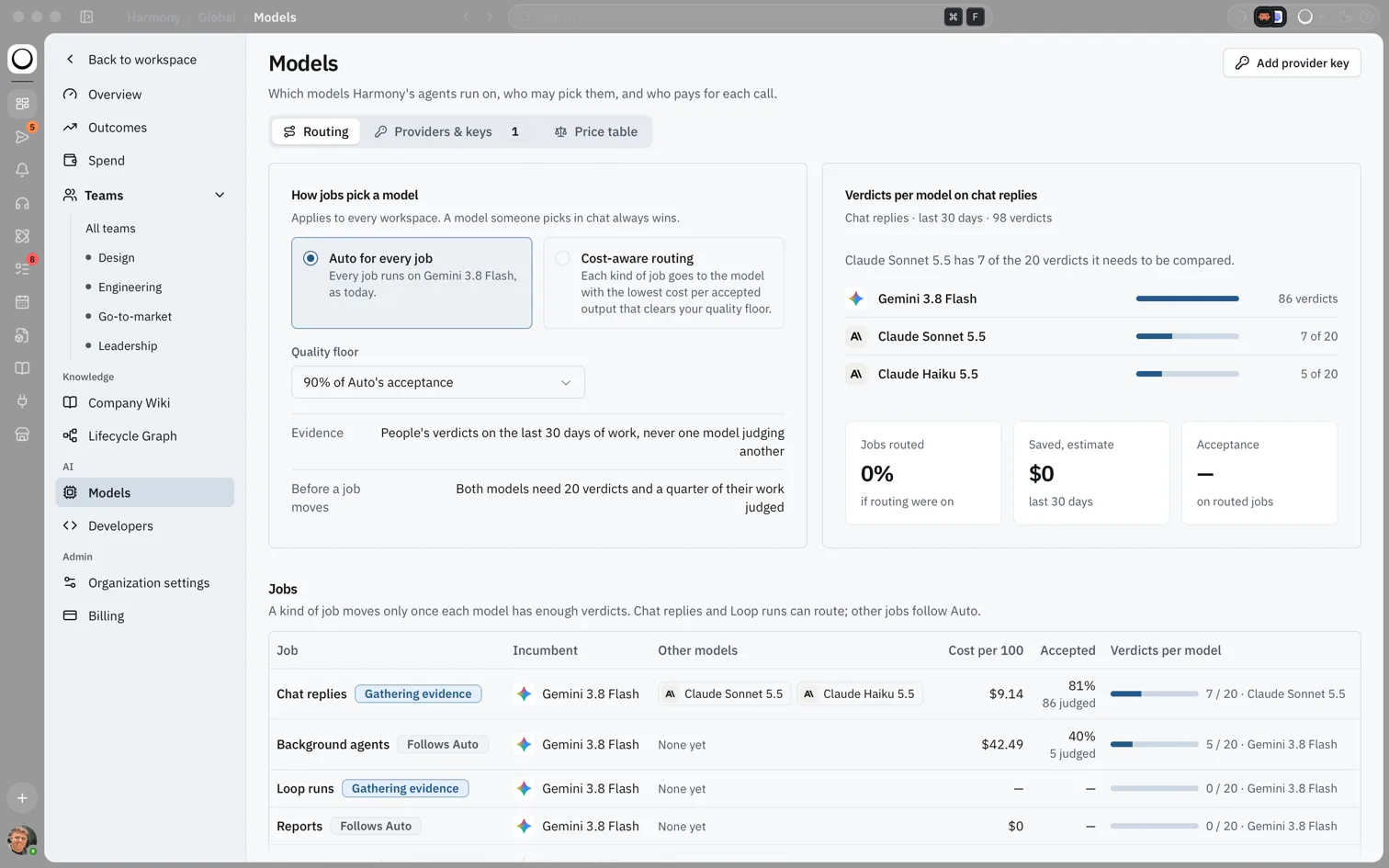
What you'll see: The title Models with "Which models Harmony's agents run on, who may pick them, and who pays for each call." Three tabs: Routing, Providers & keys and Price table, and an Add provider key button.
How this fits in Harmony
flowchart LR
  Job[A chat reply or Loop run] --> Pick{Did someone pick a model?}
  Pick -->|Yes| Chosen[That model]
  Pick -->|No| Routing[Routing: Auto or cost-aware]
  Chosen --> Key[Own key first, then team key, then organization key, else Harmony's models]
  Routing --> Key
Routing
Auto for every job runs every job on Harmony's recommended model. It is the default.
Cost-aware routing sends each kind of job to the model with the lowest cost per accepted output that still clears your Quality floor. The floor is a share of Auto's acceptance, from 80% to 100%, and starts at 90%. Harmony decides from people's useful and not useful verdicts on the last 30 days of work, never from one model judging another. A job moves only once both models have at least 20 verdicts and a quarter of their work judged.
Chat replies and Loop runs can route; other jobs follow Auto. The Jobs table shows each kind of job with a badge: Routed, Would route, Stays on Auto, Gathering evidence or Follows Auto. A model someone picks in chat always wins over routing.
Note: Model routing is on paid plans. On Free, every job runs on Auto.
Who may pick which model
When Let people pick is on, the chat box lists the models your organization allows. Auto stays the default. A team's own list replaces the organization's list for its members; leave every box empty to use the organization's list. Every change is written to the audit log.
In chat, the model chip beside the chat box shows Auto with a Recommended badge, the models allowed for your team, and any models on your own keys, which aren't counted against your limits. A model your team may not use shows Not for your team.
Providers & keys
This tab lists each model provider with its billing, which teams it serves, what it runs, its region and its status. Here admins add the organization's provider keys and self-hosted servers, and read Key custody: how Harmony holds the keys. See Bring your own model.
Price table
The Price table lists each model's input and output price per million tokens. Billed as says who pays: Counts against usage limits for Harmony's models, or your provider key plus the 10% Harmony fee. Pickable says who may pick it: Auto, Everyone, Some teams or No.
Example scenario
Tom is an admin at a 200-person firm. After a month of verdicts, the Routing tab shows that chat replies on a smaller model are rated useful almost as often as on Auto, at a third of the cost. He turns on Cost-aware routing with a 90% floor. Chat replies move once both models have enough verdicts; reports, which have too few, stay on Auto. Next month, Outcomes shows the same useful rate for less spend.
FAQs {#faqs}
Q: Who can change models? A: Admins. Changes to routing and to who may pick which model are written to the audit log.
Q: Can people pick their own model? A: Only if an admin turns on Let people pick. They then choose from the chip beside the chat box.
Q: Does cost-aware routing lower quality? A: It moves a job only when the cheaper model is rated useful at least as often as your quality floor, based on people's verdicts.
Q: Why does a job say Gathering evidence? A: The models haven't had enough verdicts yet. Each needs 20 and a quarter of its work judged. See Judging work and the useful rate.
Q: Why can't I open the Models page? A: It is for admins. You'll see "Models are set by admins"; use the model chip in chat instead.