Teams and policies
Business Summary: Teams and policies let you attach org-wide rules — NTU budgets, HITL strictness, connector constraints — to business units so governance stays consistent as workstream volume grows.
On the Governance page, teams and policies work together: a team names a business unit; policies define what that unit must enforce.
Note: Governance shows sample team cards in a demo workspace (member and policy counts). Production orgs may see Governance not configured until live org policies are configured. Workstream HITL remains the practical configuration surface today.
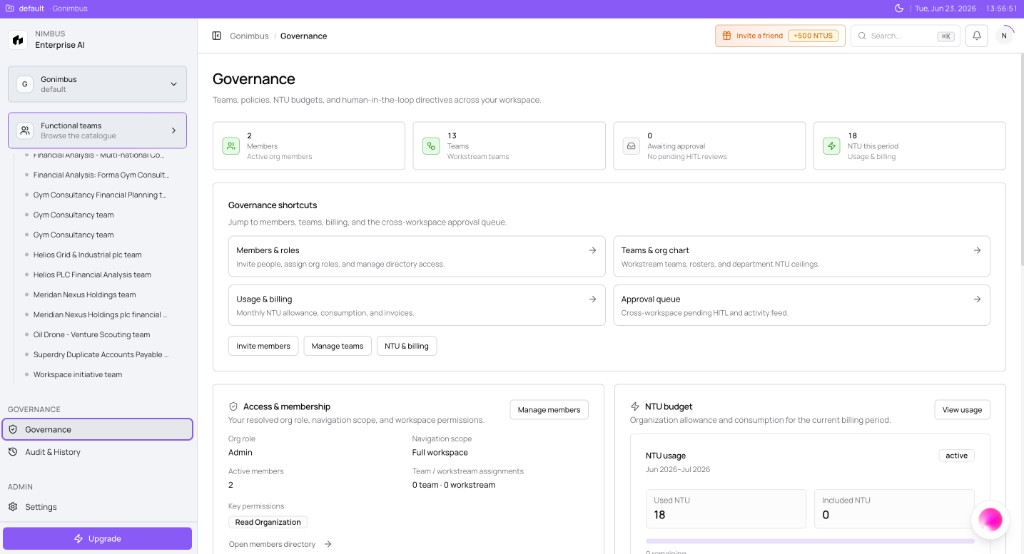
Governance dashboard walkthrough
Open Governance in the sidebar (breadcrumb Governance):
| Area | What to do |
|---|---|
| Summary cards | Scan Members, Teams, Awaiting approval, NTU this period — click through to the live surface |
| Governance shortcuts | Members & roles → Organization members and roles; Teams & org chart → Browsing Teams; Usage & billing → Settings |
| Quick actions | Invite members → Inviting teammates; Manage teams → org chart |
| Access & membership | Confirm your Org role and Navigation scope match expectations before approving Critical writes |
| NTU budget | Mini usage card links to Settings → Usage & Billing for pool and overage detail |
How this fits in Nimbus
Governance teams carry policies that stack with agent triggers and workstream HITL. The strictest applicable gate usually wins when a run reaches a checkpoint or Confirm & run.
flowchart LR
  GT[Governance team] --> Pol[Policies]
  Pol --> HITL[HITL strictness]
  Pol --> NTU[NTU budget]
  Pol --> Conn[Connector rules]
  Pol --> Run[Governed runs]
  WS[Workstream HITL] --> Run
  SG[Agent triggers] --> Run
Governance teams
Examples from demo layout: FP&A Office (finance planning and close workstreams), Brand & Legal (marketing and compliance-sensitive outputs), Operations Council (cross-functional operational decisions).
Each card lists members and active policies. These are governance teams — not the same as workstream teams, though membership may overlap.
See Governance teams.
Policy types
Policies may include HITL strictness (dual approval for external writes), NTU budget (800 NTU/month cap visibility for FP&A), connector export (block bulk CRM export without admin sign-off), and spend threshold (Critical checkpoint above 100 NTU run quote).
Policies stack with agent defaults and workstream presets — the strictest applicable gate usually wins.
Configuring policies today
Until the org policy editor is live, set workstream HITL during create or edit (Standard, Strict, or Custom) and coordinate with administrators for team records where available.
Empty state tips on Governance suggest mapping NTU budgets and linking connector rules — follow those themes at workstream level meanwhile.
Workstream governance messages
When no org policies exist, workstream settings may show: "No workstream governance policies yet. Configure HITL and approval stages when creating or editing a workstream." That is normal — it prompts workstream-level setup, not an error.
Example scenario
Brand & Legal governance team carries a policy requiring Legal approver on all public messaging connector writes. Marketing workstreams inherit Strict HITL at workstream level today because the org policy editor is partial. When a campaign agent proposes a Slack post via action connector, Critical HITL assigns both marketing owner and Legal approver before execution.
What you'll see
What you'll see: A demo workspace — three-column grid of team cards. Non-demo — shield empty state with configuration tips. Future UI will list editable policies per team.
FAQs {#faqs}
Q: How many policies should a team have? A: Start small: output review + action write gate + optional NTU budget. Add spend thresholds when runs grow.
Q: Do policies apply to every agent automatically? A: Org policies target teams and business units. Workstreams still need team assignment and compatible HITL presets.
Q: Can two teams share one policy? A: Reusable policy templates are planned. Today duplicate settings per workstream if needed.
Q: Who edits policies? A: Organization admins and super admins. Members experience policies as checkpoints.
Q: Where are org policies managed? A: On the Governance page when available, and through workstream approval settings today. See What works today if your Governance page is empty.
Q: Do policies replace workstream HITL? A: No. They complement it. Workstream HITL is the live control surface; org policies provide consistent defaults at scale.