Organization members and roles
Business Summary: Three organization roles — Admin, Member, and Viewer — define what each person can do across the workspace before workstream-level roles further narrow access.
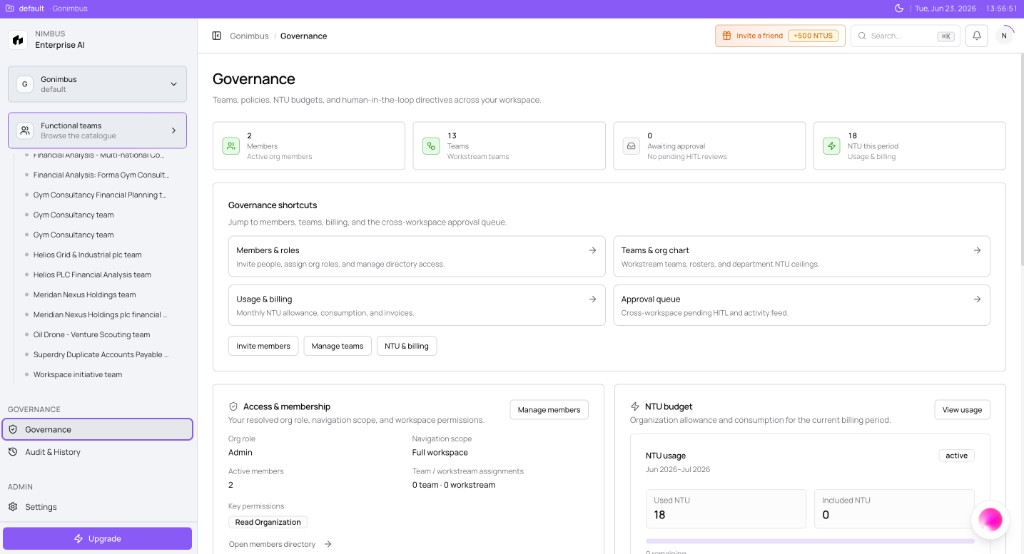
Open Governance in the sidebar for the workspace dashboard — member counts, team roster, NTU usage, and shortcuts to Members & roles, Teams & org chart, Usage & billing, and the Approval queue.
How this fits in Nimbus
Organization roles are the first layer of access. Workstream roles (Owner, Approver, Contributor, Viewer) are the second — together they determine who can open a goal, run agents, approve checkpoints, and see sensitive wiki content.
flowchart TB
  Org[Org role: Admin Member Viewer]
  WS[Workstream role: Owner Approver Contributor Viewer]
  Cap[Capabilities]
  Org --> Cap
  WS --> Cap
Organization roles
Nimbus uses three organization roles:
| Role | Capabilities |
|---|---|
| Admin | Everything at org scope: invite team members (including Company Wiki access grants), manage Settings → Usage & Billing, manage org NTU pool and caps, connect org-level integrations, install agents, edit governance policies, create and delete any workstream |
| Member | View workstreams they were invited to; create their own workstreams (and attach connections to those workstreams); run agents; chat with Perception within their access scope; approve actions where assigned as Approver |
| Viewer | View information only — shared workstream outputs, Decision History, Perception answers where shared; no runs, no approvals, no settings |
Your org role is separate from workstream team roles. You need sufficient org access and team membership for restricted workstreams.
See Org access tiers for a capability checklist and Company Wiki access control for explicit wiki grants.
Workstream roles
Workstream roles apply per goal — who can collaborate, run, and sign off on one workstream:
| Workstream role | Capability |
|---|---|
| Owner | Invite collaborators, set roles, approve critical actions, manage workstream NTU ceiling, attach workstream-scoped connections |
| Approver | Sign off at HITL gates before write-side actions execute |
| Contributor | Launch runs, review outputs, draft recommendations |
| Viewer | Read outputs and decision history only |
Deep dive: Workstream teams and access.
Company Wiki access control
The Company Wiki may contain sensitive documents — HR policies, pay packages, compensation bands, personal data. Access must be explicitly granted; it is not inherited by default when someone joins the org.
Admins grant wiki scope during invite or through directory tools. Members only see vaults and folders they were granted. Viewers do not browse or upload wiki content unless explicitly shared.
See Company Wiki access control.
Where roles appear in the product
| Surface | What you see |
|---|---|
| Governance dashboard | Member count, Access & membership card with org role and navigation scope |
| Settings → Members & Directory | Roster, invites, role assignment (when shown) |
| Workstream create/edit | Collaborator roles — Owner, Approver, Contributor, Viewer |
| Governance → Teams | Team profiles and Members tables with HITL assignments |
Example scenario
A 12-person finance department invites ten Members and two Admins. Analysts run Plan mode agents and approve Hard checkpoints where assigned. The controller is an Admin who manages connectors, billing, and wiki grants for the finance policy vault. External auditors join as Viewers — they read shared outputs on Live Canvas but cannot confirm runs, change settings, or browse restricted wiki folders.
FAQs {#faqs}
Q: What's the difference between org Viewer and workstream Viewer? A: Org Viewer is read-only across the workspace. Workstream Viewer is read-only on one goal — you can still be a Member org-wide with Viewer on a specific workstream.
Q: Can a Member manage billing? A: No. Usage & Billing admin actions require Admin. Members may view usage when policy allows.
Q: Who grants Company Wiki access? A: Admins — explicitly during invite or admin directory flows. See Company Wiki access control.
Q: Can Viewers submit support requests? A: Yes. See Contact support.
Q: How do I change someone's org role? A: Admins update roles through Governance → Members & roles or Settings → Members & Directory.
Q: Do invited users count toward plan seats? A: Active members typically count once they accept. See Plans, seats, and included usage.