Connector catalog
Business Summary: The connector catalog is your searchable library of Intelligence and Action sources — find the right system quickly and connect before an agent run is blocked.
The connector catalog loads when you open Connectors from the sidebar (Knowledge section). Nimbus merges a curated static list with an extended vendor directory at runtime — 2,000+ integrations when configured. Use the catalog to discover sources before scoping a workstream; readiness checks later flag missing connectors so you do not spend NTUs on blocked runs.
Search and filter
- Open Connectors from the sidebar under Knowledge.
- Read the page hero — Agents that read and act in your tools — and note the integration count (for example, Showing 10 of 2,081).
- Click the Search by name, category, or use case… field and type a keyword — for example, hubspot, snowflake, or slack.
- Open the All statuses dropdown and filter to Available if you only want connectable entries today.
- Open the All usage types dropdown and narrow to Intelligence (read) vs Action (write) connectors.
- Click category chips below the search bar — Marketing, CRM, Productivity, Developer Tools, etc. — counts show available integrations per category.
- Scan connector cards: logo, name, category label, description, and status badge (Available, Beta, or Coming Soon).
- Read the card description to confirm the connector matches your use case before connecting.
- Click the connector name or card to open the detail dialog — review available tools (reads and writes), data the connection exposes, and typical use cases before you activate.
- Flip the toggle on an Available card to start the connect flow — see Connecting a connector.
- After connecting, confirm the card shows Connected and check whether Configure appears for Action connectors.
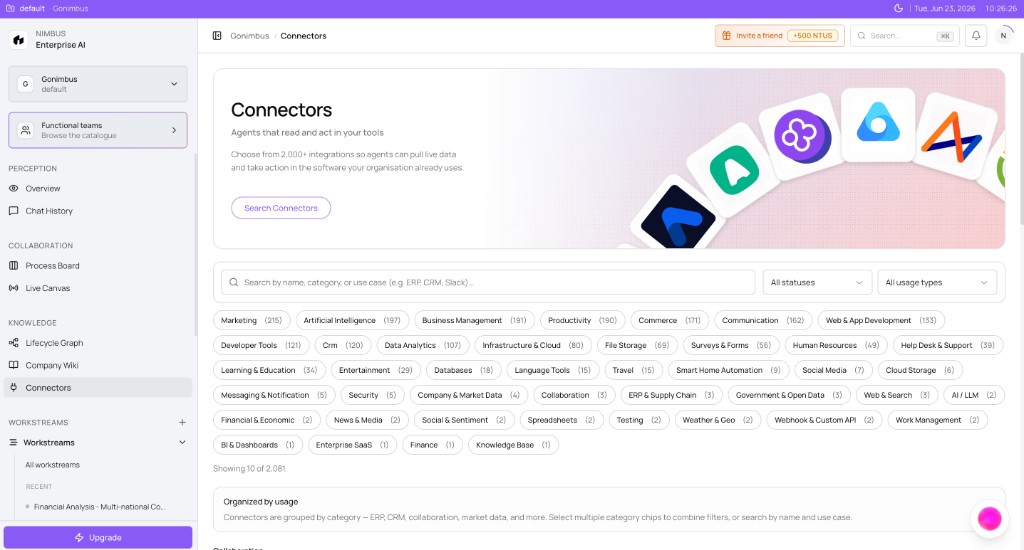
What you'll see: Search field, All statuses / All usage types filters, category chips with counts, and connector cards with logo, name, category, status badge, and connect toggle.
Connector card details
Each card is designed for quick evaluation before you commit OAuth time or API keys.
| Element | Description |
|---|---|
| Name | Connector display name |
| Category | Business category — Enterprise SaaS, CRM, Messaging, etc. |
| Description | Short summary of what the connector does |
| Status badge | Available, Beta, or Coming Soon |
| Toggle | Turn on to start connect flow — see Connecting a connector |
| Detail dialog | Click the card to review tools (MCP reads/writes) and data scope before OAuth |
Coming Soon entries appear in search results but the toggle is disabled — plan alternative sources or check back after your admin enables the integration.
Review tools before you connect
Every connector exposes its own set of tool calls — the reads and writes Nimbus can perform once connected. Before activating:
- Click the connector card in the catalog.
- Read the detail dialog — what data can be read, what actions can be written, and which agents typically use this integration.
- Decide whether you need Intelligence (read), Action (write), or both for your workstreams.
This review step saves OAuth time when a connector does not match your use case.
How the catalogue is built
| Layer | What you see |
|---|---|
| Curated static | ~41 Nimbus-owned connectors |
| Extended vendor directory | Additional apps merged at runtime (~2,000+ when configured) |
| Coming Soon | Listed but toggle disabled |
The catalogue is shared across customers; vendor directory merging and feature flags may add or hide entries per workspace. Bind the connectors a workstream needs while you scope it — see Connector readiness.
Intelligence vs Action — quick filter tip
When filtering All usage types, remember the distinction from the Connectors overview:
- Intelligence connectors let agents read CRM, ERP, warehouse, and document data during runs.
- Action connectors let approved runs write back — Slack posts, folder exports, ticket updates — after HITL gates clear.
Most onboarding starts with one Intelligence source (CRM or accounting) plus optional Action connector (Slack) for alerts.
How this fits in Nimbus
flowchart LR
  Catalog[Connector catalog] --> Search[Search and filter]
  Search --> Connect[Connect a source]
  Connect --> AgentReq[Agent requirements]
  AgentReq --> Workstream[Workstream execution]
Browse here, connect once at the organization level, then bind connectors when scoping a Workstream.
Example scenarios
Supply chain analyst — Snowflake before scoping
Tom scopes a Supply chain Workstream and needs Snowflake warehouse access. He opens Connectors, searches snowflake, and connects the Available card via OAuth. He filters category chips by CRM to find related Action connectors for ticket updates. Two Intelligence sources show Connected before he assigns the agent during New workstream setup. Readiness passes on his first Plan run.
RevOps admin — catalog audit for the team
A RevOps admin audits the catalog for her team before quarter close. She clears all filters, sets All statuses to Available, and exports a mental checklist: HubSpot (CRM), Xero (accounting), Slack (Action). She connects missing entries, configures Slack channels via Configuring a connector, and shares the Connectors overview with analysts so they know which toggles are already Connected at the org level.
FAQs {#faqs}
Q: Why don't I see a connector I expected? A: Clear filters and search by partial name. It may be Coming Soon or not yet in the merged vendor directory for your environment.
Q: Is the catalogue the same for every customer? A: The core catalogue is shared; vendor directory merging and feature flags may add or hide entries per workspace.
Q: Where do I connect after I find a card? A: Turn the toggle on and follow the OAuth connect flow — see Connecting a connector.
Q: What does Beta mean on a connector card? A: Beta connectors are available to connect but may have limited agent coverage or incomplete governance metadata. Prefer Available connectors for production workstreams until your admin confirms Beta readiness.
Q: Can I connect the same vendor twice? A: Usually one organization-level connection per connector type is enough. Reconnect or rotate credentials from Managing connections if tokens expire.
Q: What is the difference between Available and Beta? A: Available connectors are production-ready. Beta connectors work but may have limited scopes or changing behavior — confirm with your admin before Critical writes.
Q: Can I connect the same connector twice? A: Connections are organization-scoped. One successful connect makes the source available across workstreams — see Managing connections.
Q: How do category chip counts work? A: Counts reflect connectors matching your current status and usage filters within that category.
Q: Do I need to connect every card an agent lists? A: Agents declare requirements; connect the Intelligence sources your run needs. Action connectors are optional until you enable writes.
Q: Where do document connectors sync to? A: Document Intelligence connectors also feed the Company Wiki — see Connectors and the Wiki.