What is the Company Wiki?
Business Summary: The Company Wiki is where your organization stores approved policies, manuals, and connector-synced documents — the institutional knowledge agents cite during governed runs.
The Company Wiki is the document vault view of Nimbus operating memory. It is not a separate product from the Lifecycle Graph — wiki vaults are nodes in the same graph that also shows execution lineage, domain context, and governance history.
Open Company Wiki from the sidebar (Knowledge section). Both views read the same underlying data; the wiki view is optimized for browsing folders, previewing files, and searching policies.
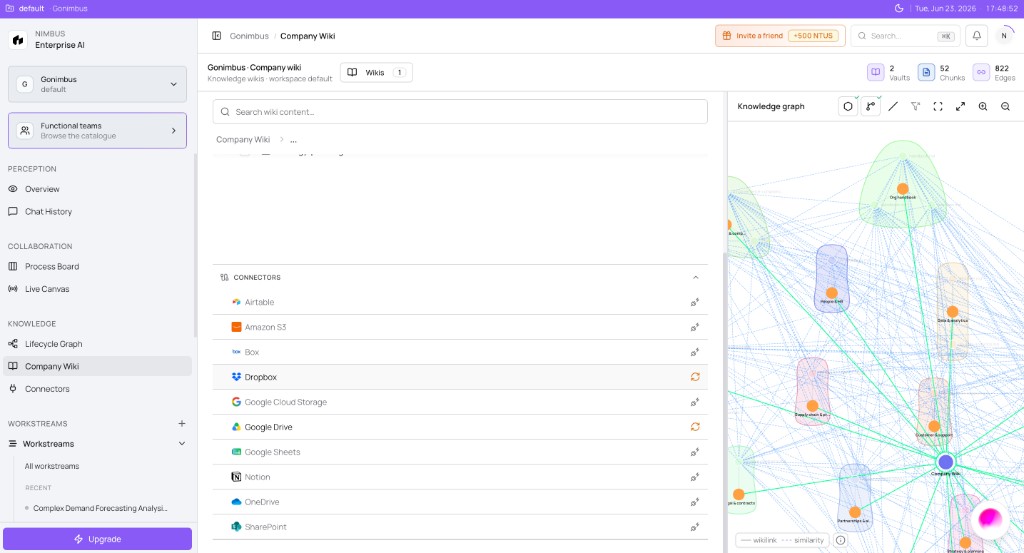
What lives in the wiki
| Content type | Examples |
|---|---|
| Policies and procedures | Expense policy, security standards, brand guidelines |
| Manuals and playbooks | Sales methodology, onboarding runbooks, board templates |
| Connector-synced files | Google Drive folders, Notion pages, SharePoint libraries |
| Onboarding seed data | Products, markets, competitors imported during setup |
Live connector data tells agents what is happening now. Wiki content tells them what your organization says about a topic — the language approvers expect in outputs.
Wiki vaults and views
Documents are organized in vaults (for example a default Company Wiki vault). Within a vault you can:
| View | Purpose |
|---|---|
| Browse | Folder tree, list, or table — preview Markdown, PDFs, and spreadsheets |
| Search | Keyword and semantic search across indexed vault content |
| Graph | See how a document connects to related wiki pages and domain nodes |
| Upload | Add files directly when upload is enabled for your workspace |
Indexed files show an indicator in browse lists — only indexed content is reliably searchable and citable by agents.
How agents use the wiki
During Plan and Analyze runs, agents retrieve indexed wiki passages alongside live connector data. If a policy is missing from the wiki, outputs may lack approved terminology or conflict with governance expectations.
Typical flow:
- Add knowledge — upload, sync from connectors, or import during onboarding
- Browse and search — verify the corpus before high-stakes runs
- Scope a workstream — agents inherit vault content available to the team
- Run and approve — citations and drafts should align with wiki policy language
See the Company Wiki and vaults section for how indexed content feeds agent retrieval.
Permissions
Org membership alone does not expose every vault. Admins grant wiki access for sensitive content (HR, compensation, personal data). See Company Wiki access control.
Company Wiki vs Lifecycle Graph
| Lens | Best for |
|---|---|
| Company Wiki | Reading policies, uploading files, semantic search |
| Lifecycle Graph (tree) | Tracing workstreams, runs, approvals, and growth stages |
| Lifecycle Graph (network) | Exploring products, markets, competitors, and relationships |
All three are views of one operating memory graph. See Lifecycle Graph for tree and network views.
Ready to try it?
- Open Company Wiki or Lifecycle Graph from the sidebar.
- Confirm your default vault shows onboarding or synced content — if empty, see Adding wiki content.
- Search for a policy you expect agents to cite — see Browsing and searching wiki content.
What to do next
- Populate vaults → Adding wiki content
- Search and preview → Browsing and searching wiki content
- Grant access → Company Wiki access control
FAQs {#faqs}
Q: Is the Company Wiki separate from the Lifecycle Graph? A: No. Wiki vaults are document nodes in the same operating memory graph.
Q: Do I need wiki content before my first agent run? A: Connectors supply live data; wiki supplies policy context. Both improve credibility. See the Onboarding checklist.
Q: Can connectors sync files into the wiki? A: Yes — document connectors can feed vaults. See Connectors and the Wiki on the connectors hub.
Q: Why can I browse some files but search does not find them? A: Only indexed files appear in semantic search. Check indexing status in browse or retry sync — see Browsing and searching.
Q: Who can upload or change wiki content? A: Depends on org role and vault grants. See Company Wiki access control.