Usage limits
Business Summary: Each person on a paid plan can use Harmony Agent up to a five-hour limit and a weekly limit. Harmony shows how much of each you have used as a percentage, with the time it resets, so nobody has to think in tokens or credits.
Your plan includes Harmony Agent work for everyone on it. To keep that fair, each person has two limits that refill on their own: one over five hours and one over a week. Most people never reach them. If you do, you can wait, keep going with extra usage, or switch to your own model key.
Step-by-step: check your usage
- Open your profile from the menu under your name, then choose the Usage tab.
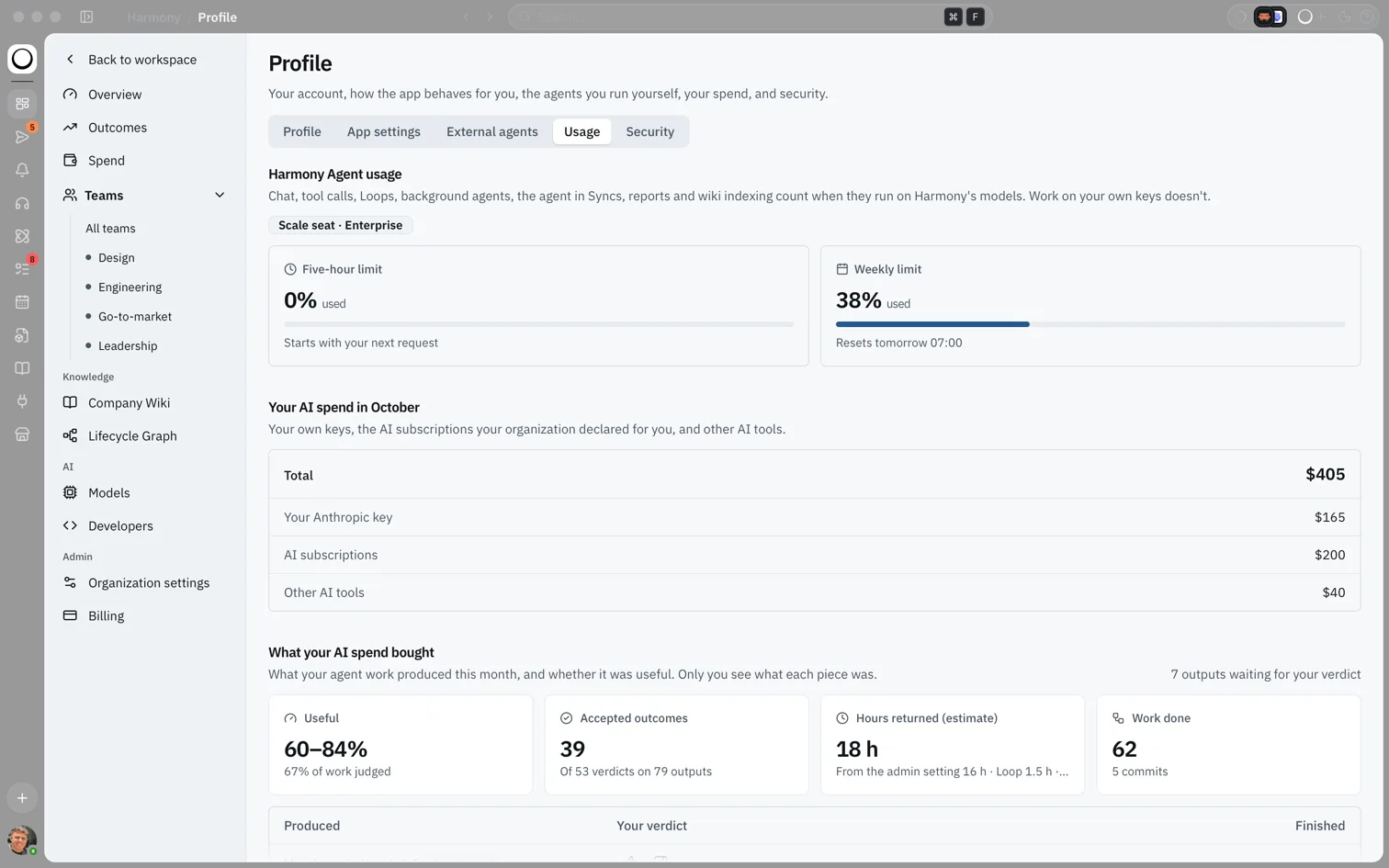
- Under Harmony Agent usage, read the two cards: Five-hour limit and Weekly limit. Each shows the share you have used and when it resets.
- Glance at the small ring in the app header while you work. It appears once you have used something in the current window, and shows a percentage from 80%.
- Hover over the ring to see both limits and their reset times. Click it to open Profile → Usage.
- Below the limits, Your AI spend lists spend on your own keys and on AI tools your organization pays for, in money.
What you'll see: The Usage tab with your seat (for example Pro seat or Scale seat), a card for each limit with "% used", and a line such as Resets tomorrow 07:00 or Starts with your next request.
How this fits in Harmony
flowchart LR
  Work[Harmony Agent work] --> Counts{On Harmony's models?}
  Counts -->|Yes| Limits[Five-hour and weekly limits]
  Counts -->|No: your own key or local model| Free[Not counted]
  Limits --> Chip[Header usage ring]
  Limits --> Profile[Profile → Usage]
What counts
Work counts when it runs on Harmony's models. That includes chat, tool calls, Loops, background agents, the agent in Syncs, reports and wiki indexing.
These never count:
- Work on your own model key, or your organization's key. See Bring your own model.
- Local models on your computer and your organization's self-hosted servers. See Local models.
- Work that failed or was cancelled. It shows "Didn't count against your limit".
After a piece of work finishes, Harmony can show what it used, for example "Used 2% of your five-hour limit".
How the limits work
Each limit is a window. It opens with your first counted request after the last one reset, and runs for five hours or a week from there. It doesn't follow the clock or the calendar. If nothing has started a window yet, its card says Starts with your next request.
| Plan | What you get |
|---|---|
| Free | A one-off trial allowance. It doesn't reset. |
| Pro | A five-hour limit and a weekly limit for each person. |
| Scale | Ten times Pro's usage, for the people an admin moves to a Scale seat. |
| Enterprise | As set in your contract. Some contracts share one pool across the organization; the usage cards then say it is shared. |
Reset times are shown in your local time.
When you get close
At 80% of either limit, Harmony tells you once for that window: "You've used 80% of your five-hour limit". A note above the chat box says the same, with the reset time and a See usage link. Harmony Agent keeps working until the limit.
When you reach a limit
Harmony doesn't start new work once a limit is used up, and nothing is charged for the request it turned down. A card shows Usage limit reached with three choices:
- Wait for the reset. The card shows when.
- Use extra usage. If your organization has turned on extra usage, your work carries on for the rest of this window. It is billed to your organization at the model's cost plus 30%, up to the monthly cap an admin sets. If extra usage is off, the card suggests asking an admin.
- Switch to your own model key. Work on your own key never counts against your limits. The provider bills you, and Harmony adds a 10% fee.
On Free there is no extra usage. Admins see an option to upgrade to Pro instead.
Marketplace Apps and your limits
Runs of a Marketplace App count against the limit of the person who installed it, like any Loop. Listings show the cost of a run as a share of a five-hour limit, for example "About 3% of a five-hour limit a run", once the App has run at least once.
Example scenario
Ana is on a Pro seat and spends a Tuesday drafting a board pack with Harmony Agent. Mid-afternoon the ring in the header shows 82%, and a note above the chat box says her five-hour limit resets at 16:40. She finishes the last section, reaches the limit, and chooses Use extra usage, which her organization has turned on. Her work carries on and the cost goes on the organization's monthly bill.
FAQs {#faqs}
Q: Do usage limits use credits or tokens? A: Harmony shows usage only as a share of each limit. You never need to count tokens or credits.
Q: Is the limit per person or per organization? A: Per person on Pro and Scale. Some Enterprise contracts share one pool across the organization.
Q: Does a failed run use up my limit? A: No. Failed and cancelled work doesn't count.
Q: Why can't I see the ring in the header? A: It appears only once you have used something in an open window. Open Profile → Usage any time to see both limits.
Q: Who can turn on extra usage? A: A Global Admin, on the Billing page under Add-ons, with a monthly cap. See Extra usage, add-ons and the Harmony fee.
Q: How do I get more usage without extra cost per request? A: Ask an admin to move you to a Scale seat, which has ten times Pro's usage, or add your own model key.