Plans and overage
Business Summary: Included NTU pools on each plan set your monthly agent-work budget; overage is what happens when usage exceeds that pool — either metered billing or blocked runs — so finance can choose predictability versus flexibility.
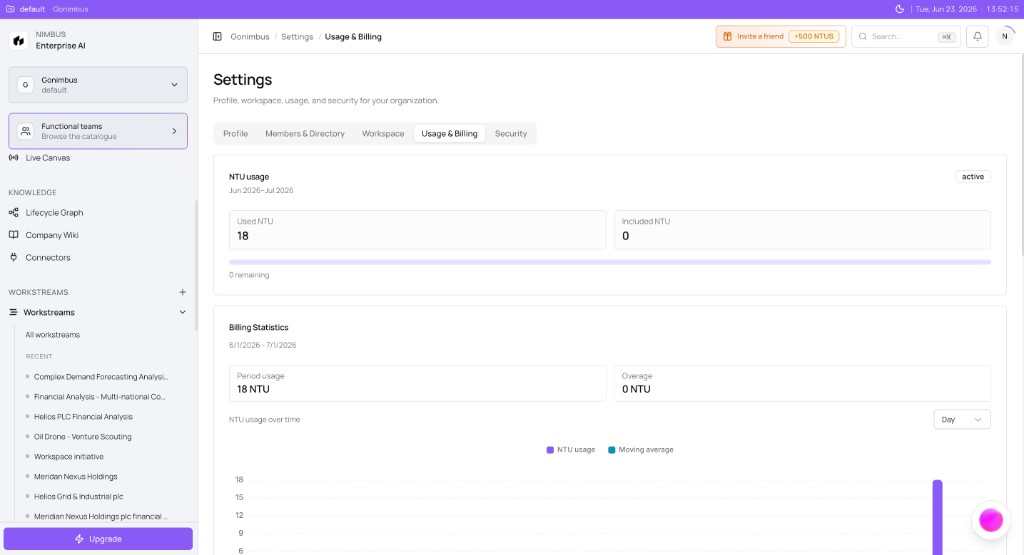
You will learn how included NTU pools work on each plan, what happens when you exceed them, and how overage differs from commitment add-ons.
Note: Plan entitlements below reflect standard Pro / Team / Business checkout. Your dashboard currently shows sample data until your workspace billing is activated — invoices govern actual charges once live.
Every governed Plan run deducts from your org's included pool. When the pool is exhausted, Nimbus either allows overage (extra NTUs billed on the invoice) or blocks new runs at Confirm & run, depending on account policy. Understanding that split helps you avoid surprise bills or stalled workstreams at month-end.
Plan tiers set the included NTU pool that all workstreams share. Runs post usage to the pool; the Usage dashboard and header meter track progress; overage or blocks apply only after the pool is fully consumed.
Included pools by plan
| Plan | Included NTU / billing period | Included seats |
|---|---|---|
| Pro | 200 | 1 |
| Team | 2,000 | 10 |
| Business | 5,000 | 25 |
Included NTUs reset each billing period. Unused NTUs typically do not roll over — confirm on your contract.
Full plan guidance: Choosing the right plan.
Total included pool
Your effective pool may be higher than the base table when:
- Waitlist promotional entitlements apply at signup
- Usage commitment add-ons add fixed NTU blocks each period
The Usage summary card included NTU line should reflect the total entitlement.
Overage
Overage is NTU consumption beyond your total included pool in a billing period.
Behavior depends on tier policy:
| Behavior | What users experience |
|---|---|
| Overage allowed | Runs continue; extra NTUs bill at metered rates on the invoice |
| Overage blocked | Confirm & run fails when pool exhausted |
Default product policy often allows overage on paid tiers, but admins may tighten limits via governance.
Overage vs commitment add-ons
| Overage | Commitment add-on | |
|---|---|---|
| Timing | After exceeding pool | Purchased before / during period |
| Cost | Variable per NTU | Fixed recurring charge |
| Best for | Unexpected spikes | Sustained higher baseline |
Preventing surprise overage
- Watch the header meter weekly
- Set governance NTU budgets per business unit for visibility
- Use run ceilings — runs cannot exceed quoted guardrails without replanning
- Upgrade tier or buy add-ons before busy seasons
See Run budget limits and NTU budgets and chargeback.
Enterprise
Enterprise contracts may define custom pools, overage rates, and hard caps. Self-serve plan tables do not apply — use your order form.
Example scenario
A Team-plan workspace on 2,000 included NTUs reaches 1,950 used by the 25th of the month. Two more Plan runs each quote 40 NTUs. With overage allowed, both runs complete; the invoice shows 80 overage NTUs at period end. A peer workspace with overage blocked sees Confirm & run disabled until the billing period resets — unless an admin purchases a commitment add-on mid-cycle.
What you'll see
What you'll see: Summary card with separate overage NTU count when usage exceeds included. Invoice PDF lists metered overage line items. Blocked runs show pool exhaustion on Confirm & run.
FAQs {#faqs}
Q: Does Pro allow overage? A: Policy varies by deployment. Low pools mean overage or blocks happen quickly — monitor closely.
Q: When does overage appear on the invoice? A: At period end or per billing configuration — same cycle as base subscription.
Q: Can we disable overage entirely? A: Admins may configure hard stops at 100% included usage. Contact support for account-level policy.
Q: Do refunded runs reduce overage? A: Ledger entries marked refunded adjust posted usage when supported.
Q: How do seats relate to overage? A: Seats limit users; NTU pool limits runs. Both are independent constraints.
Q: Is overage cheaper than commitment add-ons? A: Occasional spikes may cost less as overage. Sustained high usage is usually cheaper and more predictable with add-ons. See Usage commitment add-ons.
What to do next
- Monitor usage weekly → Reading your usage dashboard
- Add capacity before busy season → Usage commitment add-ons
- Understand per-run limits → Run budget limits