Budgets and spend
Business Summary: The AI spend page shows admins, in money, what the organization spends on AI that Harmony can see: own model keys, extra usage, AI subscriptions and other AI tools. On Scale, admins can set a monthly budget for each team and person, and see who is heading over.
Usage limits keep each person's Harmony Agent work in bounds. Spend is the other half: the money that goes to model providers and AI tools. The Spend page brings it together by team, person, provider and model, with a forecast for the month, so finance can see where AI money goes before the invoice arrives.
Spend is for admins. Everyone else sees their own spend in Profile → Usage.
Step-by-step: set a budget
- Choose Spend in the sidebar. In the organization area it sits under Overview and Outcomes; admins also find it in the workspace sidebar.
- Open the Budgets tab.
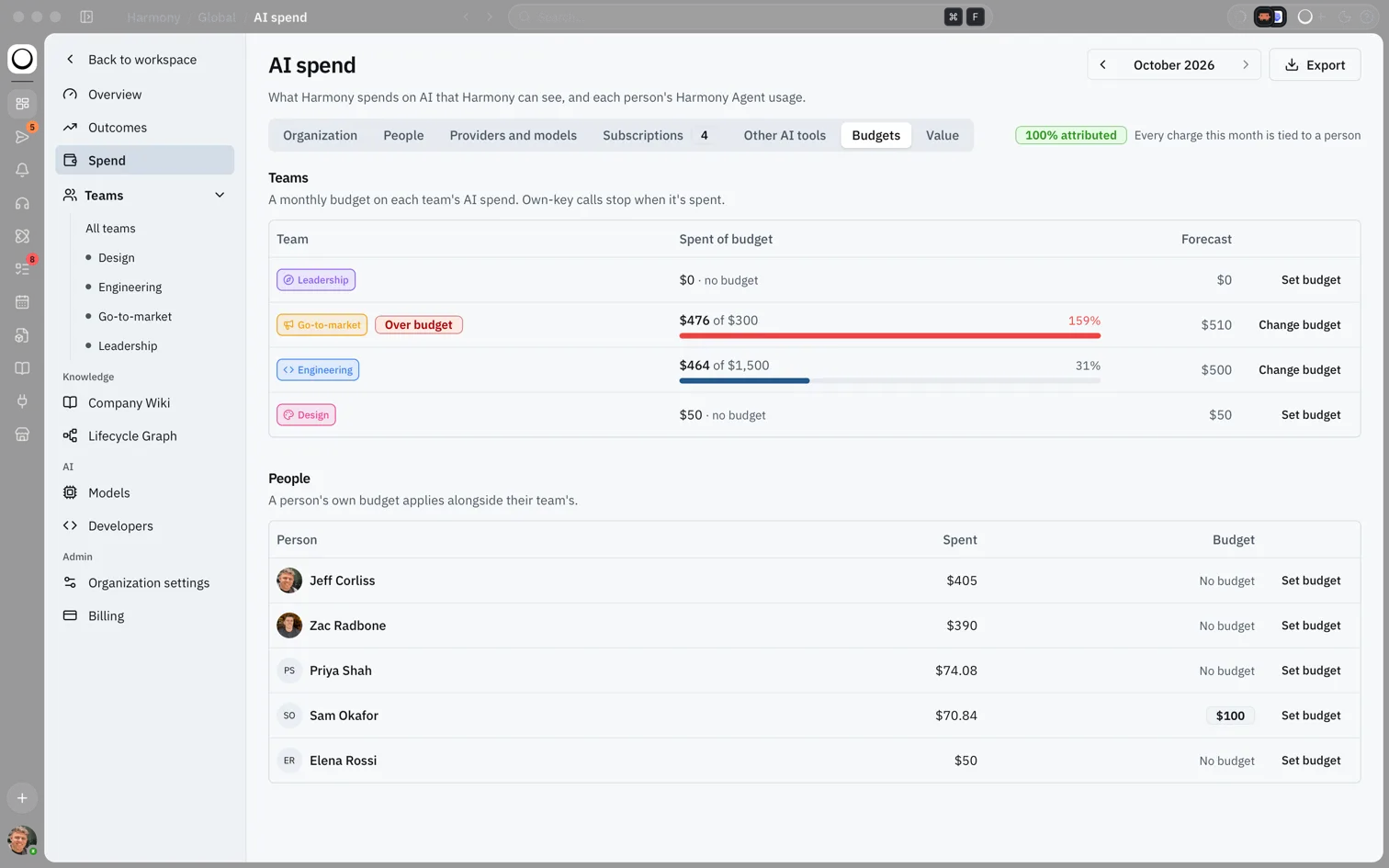
- Under Teams, choose Set budget (or Change budget) on a team's row.
- Enter the Monthly budget and save. It covers own keys, subscriptions, other tools and extra usage, and resets on the 1st.
- Under People, set a budget for a person the same way. A person's own budget applies alongside their team's.
- Check the Forecast column. It shows where each team will land at this month's pace.
flowchart LR
  Spend[Spend] --> Budgets[Budgets tab]
  Budgets --> Team[Set a team budget]
  Budgets --> Person[Set a person's budget]
  Team --> Forecast[Check the forecast]
  Person --> Forecast
What you'll see: A Teams table with Spent of budget as a bar and percentage, Over budget in red where a team has passed it, and the Forecast. Below it, a People table with each person's spend and budget.
Note: Budgets by team and person are part of Scale. Your organization has them when anyone holds a Scale seat, or on Enterprise. Without Scale, the tab says "Budgets by team and person are on Scale. Move someone to a Scale seat in Billing to set them."
How this fits in Harmony
flowchart TB
  Keys[Own model keys] --> Spend[AI spend]
  Extra[Extra usage] --> Spend
  Subs[AI subscriptions] --> Spend
  Tools[Other AI tools] --> Spend
  Spend --> Budgets[Budgets by team and person]
  Budgets --> Outcomes[Outcomes and Needs attention]
The tabs
| Tab | What it shows |
|---|---|
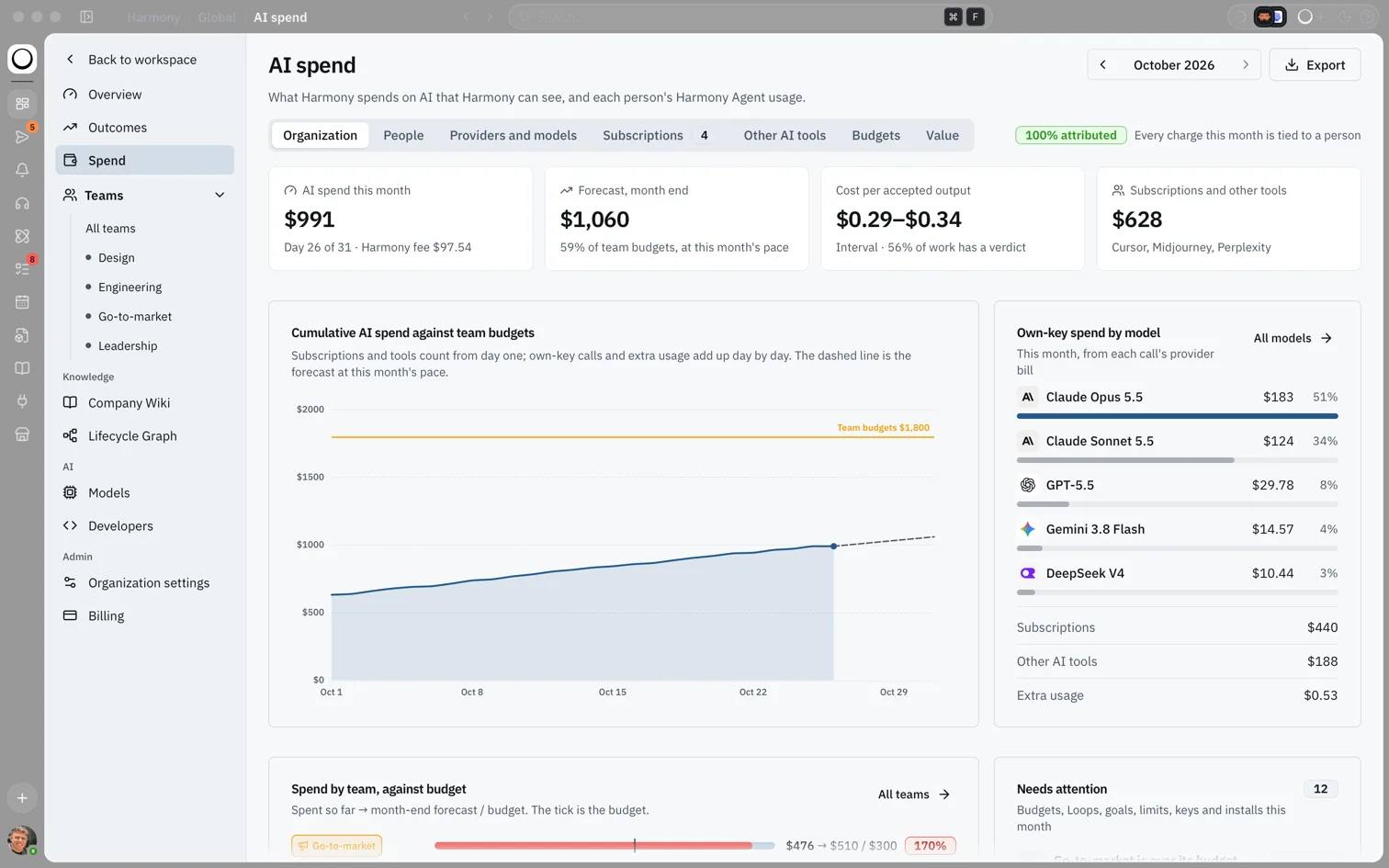
| Organization | This month's AI spend and Harmony fee, the month-end forecast, subscriptions and other tools, a chart of spend against team budgets, own-key spend by model, spend by team, and what needs attention. |
| People | Each person's team, seat, five-hour and weekly usage, AI spend and Harmony fee. |
| Providers and models | Spend by provider and model on your keys. Local models and self-hosted servers show with no fee. |
| Subscriptions | Claude, ChatGPT and other plans people use from their own devices, at the price you declare. Use Declare a subscription to add one. |
| Other AI tools | What tools like Harvey, Cursor or Perplexity cost this month, added by hand. |
| Budgets | Monthly budgets for teams and people, with spend and forecast. |
| Value | What the month's work was worth. For Global Admins; the full dashboard is part of Enterprise. See Judging work and the useful rate. |
Use the month picker at the top to look back, and Export to download the figures. A badge such as 100% attributed tells you how much of the month's spend is tied to a person.
The forecast
Subscriptions and other tools count in full from the first of the month. Own-key calls and extra usage add up day by day, so the forecast carries their pace so far to the end of the month. On the Organization tab, Forecast, month end also says what share of your team budgets that would use.
When a budget is reached
A team or person past their budget shows Over budget. One heading there shows Forecast over. A team that has spent its budget, or whose forecast reaches 85% of it, also appears in Needs attention on Outcomes.
Coding agents that use your own keys through Harmony stop when a budget is spent, with the message "This would take you past your team's AI budget. Ask an admin to raise it." To let them carry on, raise the budget on the Budgets tab.
Note: Today the stop applies to coding agents. Chat and Loops on your own keys keep running past a budget and show as over budget, so watch Needs attention.
The Harmony fee
The Harmony fee column is 10% of the AI spend Harmony can see on own keys, subscriptions and other tools. There is none on local models and self-hosted servers, or on failed or cancelled work. See Extra usage, add-ons and the Harmony fee.
Example scenario
Priya is an admin at a 60-person company with two people on Scale. She opens Spend → Budgets and gives Go-to-market £300 a month and Engineering £1,500. Two weeks later, Outcomes shows Go-to-market in Needs attention: its forecast passes its budget. She opens the People tab, sees that one person's coding agent drove most of it, and sets a £100 budget for that person.
FAQs {#faqs}
Q: Who can see the Spend page? A: Admins. Members see their own spend in Profile → Usage, and a person's spend is never shown to other members.
Q: Do budgets limit Harmony Agent usage? A: No. Harmony Agent usage on Harmony's models is governed by each person's usage limits. Budgets are for money: own keys, subscriptions, other tools and extra usage.
Q: When does a budget reset? A: On the 1st of each month.
Q: Why can't I set budgets? A: Budgets need Scale. Move at least one person to a Scale seat in Billing, or use Enterprise.
Q: Can a member ask for a bigger budget? A: Not in Harmony yet. Ask an admin directly.
Q: Where do I set a team's budget from Outcomes? A: Admins can edit a team's budget in its Outcomes panel, under Properties, on Scale or Enterprise.